تخطَّ إلى المحتوى
Notes & updates

Blog

Short pieces on the platform, the tools, and working with the catalog — no noise, no promises, just the practical bits.

Safe SMM Panel Architecture: Algorithms, Risk Factors, and Ban Prevention (2026)

In 2026, social media algorithms no longer react solely to quantitative metrics. They now analyze behavioral patterns, growth Velocity, and Connectivity Scores. Any sharp deviation from a "standard" user profile triggers security protocols, ranging from shadowbans to permanent blocks. The market for SMM infrastructure has shifted: brute-force methods from 2019 are obsolete.

Resellers and agencies often search for a "magic solution," ignoring the technical reality. A safe SMM panel is not a marketing slogan; it is a specific configuration of server settings, proxy types, and database quality. Understanding this backend architecture reduces the probability of account loss from 90% to a statistical margin of error. SmmPanelUS operates as a SaaS infrastructure to provide these tools, but the strategy remains in the hands of the user.

Briefly: Absolute protection does not exist in the API market. Safety is the management of probabilities through Speed settings, Drip-feed delivery, and the selection of verified (HQ/Real) databases. Cheap services without guarantees (No Refill) always carry a higher risk coefficient.

Technical Architecture: High Risk vs. Safe Tier

The term "safety" in the context of API services is often technical. Risks are generated by the social network's algorithms, not the panel itself. The primary difference between a secure infrastructure and a mass-market tool lies in the quality of assets and the proxying method.

The table below compares technical implementations:

ParameterMass Market (High Risk)Safe Infrastructure (SaaS Tier)
IP TypeDatacenter IP (Cheap server proxies, often blacklisted)Residential / Mobile 4G Proxy (Simulates real user devices)
Account Age0-14 days (Newly registered)6+ months (Aged Accounts with history)
Profile QualityZero-post (Empty bio/avatar)Filled bio, avatar, posts, stories
Start SpeedInstant (Causes velocity spikes)Randomized Delay (0-1 hour)

The myth of "100% ban protection" fails against the reality of code updates. Reliable infrastructure minimizes risks but does not control the moderation policy of external platforms.

Risk Calculation and Detection Math

Ignoring API limits and using Low Quality databases triggers automatic filters. Algorithms often use a variation of the Risk Factor formula:

$$Risk_{factor} = \frac{Artificial\_Activity}{Organic\_Baseline} \times Velocity$$

Here, Organic Baseline represents the account's historical activity, and Velocity is the speed of the incoming traffic. If the numerator increases while the denominator (the base audience) remains small, a flag is raised.

Sanction Types and Triggers

  • Drops (Removals): The platform deletes bot accounts. Services marked "Non-Drop" or "R30" (Refill 30 days) include a recovery buffer, whereas cheap databases burn out completely.
  • Shadowban: The account disappears from search results and the "Explore" page. This occurs when engagement metrics are unbalanced (e.g., 10,000 likes with only 50 reach).
  • Action Block: A temporary restriction (24–72 hours). This is triggered by exceeding API limits (e.g., >60 actions per hour for a fresh account).

Identifying a Safe SMM Panel

Professionals analyze the technical specifications in the API documentation or service descriptions before placing orders.

1. Service Specifications (Specs)

A transparent service card lists technical limits:

  • Start Time: A logical delay often indicates a managed queue rather than server overload.
  • Speed/Day: Explicit daily limits (e.g., 500-1000/day) allow for precise load planning.
  • Refill Button: The presence of an auto-refill function signals that the database is maintained and replenished.

2. Drip-feed Functionality

This feature is critical for safety. Drip-feed (Feature) breaks a large order into smaller micro-transactions (Advantage), smoothing the statistical graph to mimic a Natural Curve and bypassing velocity filters (Benefit).

3. Automated Refund Policy

Reliable infrastructure automates cancellations. If a social network update prevents delivery (Status: Partial), funds return to the balance. Systems that retain funds during failures indicate instability.

The Error Matrix: Why Accounts Fail

Analysis of support tickets shows that most issues stem from strategy, not the tool. Below are common patterns that lead to asset loss.

User ActionTechnical ConsequenceResult
Ordering 10k followers on a 1-day old accountVelocity Spike of 5000% above baselineInstant Ban or Drop
Buying the cheapest services ($0.001)Usage of IPs from public blacklistsAction Block + Removal
Concurrent orders from 2-3 different panelsCounter conflicts and request overloadPartial Status, Money Loss, High Risk
Buying Likes without Reach/ImpressionsAbnormal ER (Engagement Rate > 100%)Shadowban (Algorithmic suppression)

Risk Mitigation Protocols

Working with SMM infrastructure requires a systematic approach. Safety is the result of calculation.
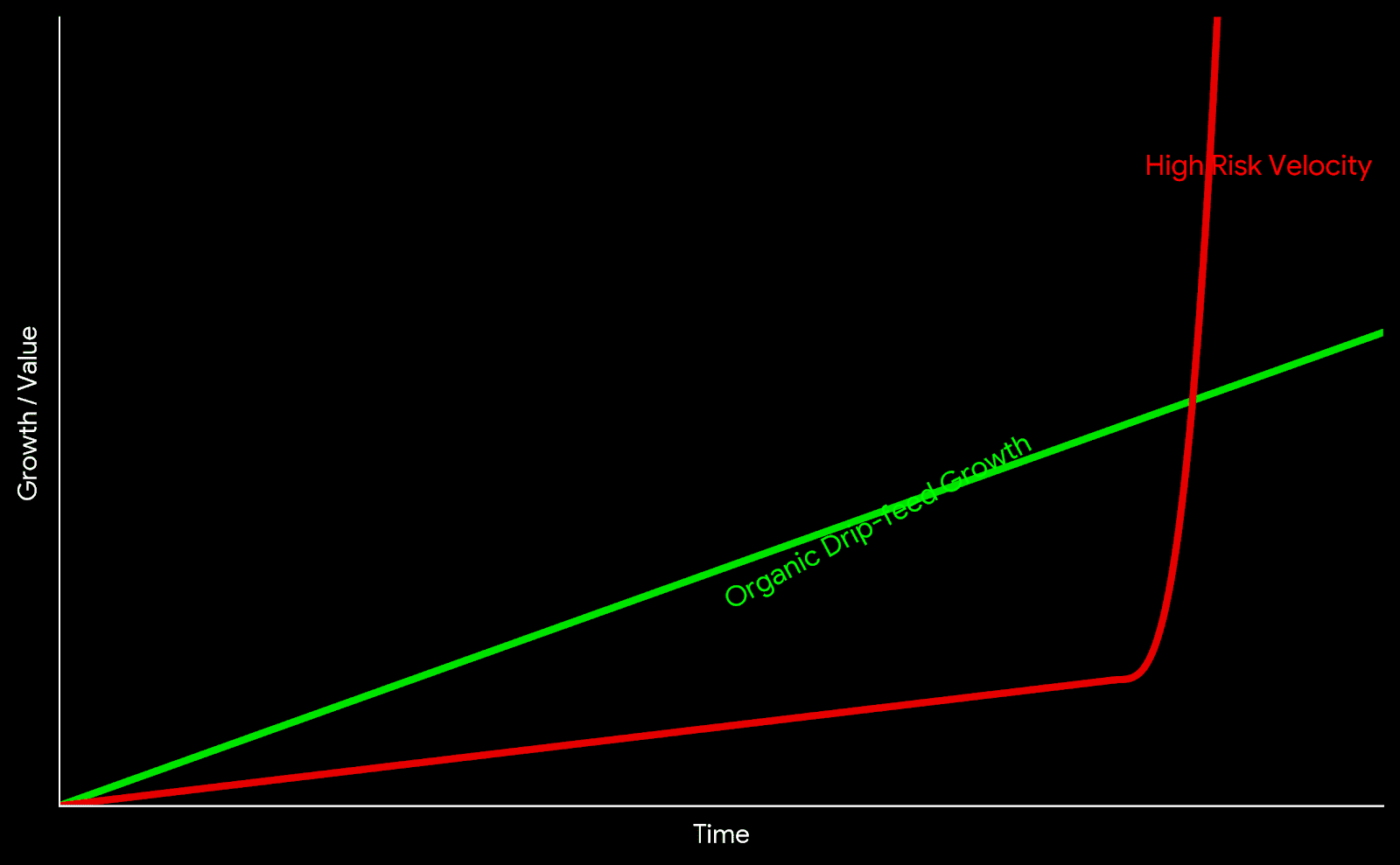
Chart comparing high risk velocity spikes versus organic drip-feed growth
Visualizing the difference between Velocity Spikes and Organic Growth patterns.

The "Warm-up" Protocol

For new accounts (under 3 months), professionals apply a progressive load scale:

  • Week 1: Organic posting, phone/email verification. Zero external services.
  • Week 2: Drip-feed at minimum speed (20-50 units/day).
  • Week 3: Increase limits to 100-200 units/day.
  • Month 2+: Transition to standard operational volumes.

The Sandbox Method (Testing)

Experienced resellers maintain "Sandbox" accounts—test profiles used to verify Service IDs before applying them to main projects. If a Sandbox account receives an Action Block or a Drop, the service is marked as risky and excluded from Tier-1 campaigns.

Safety Checklist

  • Service type verified as Real or HQ (Priority over Mixed/Bot).
  • Refill guarantee active (30/60/365 days).
  • Daily speed limits checked in description.
  • Test order completed on a Sandbox account.
  • Drip-feed configured (if available).
  • Account has organic activity (posts, stories) prior to start.

Conclusion

Safety in SMM automation is dynamic. Platforms like SmmPanelUS provide access to global infrastructure, but the user defines the application strategy. Choosing services with guarantees (Refill), using Drip-feed to manage velocity, and avoiding the cheapest market options ($0.01 per 1k) form the foundation for stable operations.

FAQ

Can an account get permanently banned for SMM services?

Yes, if violations are systematic and the account receives "Spam Reports" from real users. Isolated limit breaches usually result in temporary Action Blocks or follower removal (Drops).

What is Drip-feed and why use it?

Drip-feed is an automation feature that splits a single order into multiple smaller deliveries (e.g., 50 likes every 30 minutes). This creates a natural growth curve that is harder for algorithms to detect.

Why are expensive services considered safer?

Higher costs typically reflect the maintenance of high-quality account databases (with avatars, posts, history) and the use of residential 4G proxies, which bypass standard anti-spam filters.
قراءة المزيد

SMM Panel: A Complete Guide to Architecture, Logic, and Operations

The digital marketing market often operates with abstract terms. What users colloquially call an "SMM Panel", engineers define as an API Request Routing Gateway.

For a student, a junior marketer, or a business owner, understanding this distinction is crucial. It separates those who blindly press buttons from those who understand the underlying mechanics of automation.

This guide analyzes the infrastructure: from the moment a request is created to its actual execution on the server layer.


1. What is an SMM Panel: Dual Definition

To truly understand the tool, we must separate the marketing interface from the technical reality.

The Surface Level (For the User)

An SMM Panel is a web-based marketplace where digital metrics (subscribers, views, interaction signals) are purchased in bulk. It functions like any e-commerce dashboard: you select a category, input a target link, and process a transaction.

The Core Level (For the Engineer)

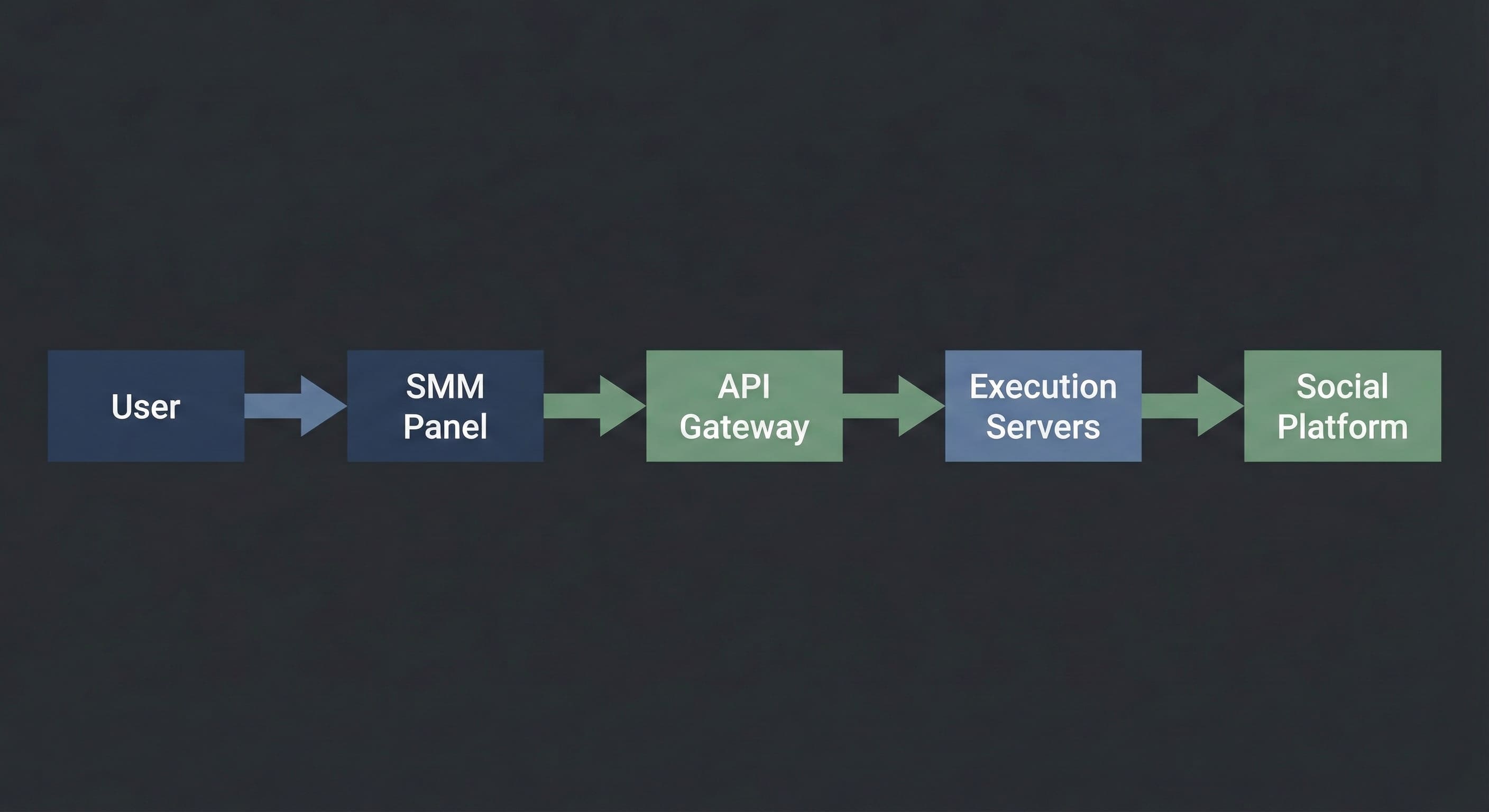
Technically, an SMM Panel is a Control Plane connected via API (Application Programming Interface) to a network of execution servers. The panel does not "generate" the metrics itself. It acts as a dispatcher: it accepts your command, validates the budget, and routes the task to a server with available capacity.

In simple terms: Think of it as a logistics center. You submit a shipping order, and the system decides which truck (server) will transport your cargo (request) and which route it will take.


2. How It Works: Under the Hood

SMM Panel architecture diagram showing user requests routed through an API gateway to execution servers

The execution process is a linear data transmission chain. It remains consistent regardless of the specific interface you use.

[How it looks to you]:

  1. You select a service (e.g., "Telegram Views").

  2. You paste the link to the post.

  3. You specify the quantity (e.g., 1,000).

  4. You click "Submit".

[What happens inside the system]:

  1. Validation: The script checks if the link format is correct and if the user balance covers the transaction cost.

  2. Routing: Your order is assigned a unique ID and transmitted to the API Gateway.

  3. Queue: If the upstream server is available, processing begins immediately. If the server is under high load, the order enters a "Pending" state, waiting for a slot in the execution queue.

  4. Execution: The server initiates the interaction signals according to the script.

  5. Completion: The system receives a "Finished" signal and updates the status to "Completed".

Critical Note: This is not magic. It is a script. It executes exactly what you input. If you provide a broken link or a closed profile, the system may still attempt execution because it does not analyze context—it only processes code.


3. The Dictionary: Industry Terminology

To operate effectively, you must understand the technical vocabulary. Misunderstanding these parameters often leads to budget waste.

  • Start Time: The latency period before execution begins.

    • Instant: Processing starts within 0–5 minutes.

    • 1h / 12h: The task is scheduled for a later window.

  • Speed (Throughput): The maximum number of actions the system can deliver per 24 hours.

    • Example: "Speed 5k/day" means the system will throttle delivery to 5,000 units daily to stay within safety thresholds.

  • Drop Rate: The percentage of metrics that may be removed by the social platform’s cleanup algorithms over time.

  • Refill / Non-Drop: A guarantee feature where the system automatically re-queues lost metrics to restore the original count.

  • Drip-Feed: A scheduling logic that splits one large order into multiple smaller batches.

    • Example: Instead of 1,000 likes at once, you configure "100 likes every 60 minutes". This smoothes the traffic curve to mimic organic behavior.


4. Market Hierarchy: The Supply Chain

The SMM market is structured like a wholesale supply chain. Knowing your position helps you avoid overpaying.

  1. Providers (The Source): These entities own the physical hardware or the software logic that generates the signals. They operate via API only and rarely deal with retail customers.

  2. Resellers (The Panels): These are platforms connected to Providers. They build the user interface, handle customer support, and curate the service list.

    • Note: Approximately 90% of panels on the market are resellers. This is standard. A high-quality reseller adds value by filtering out unstable servers and providing a single access point to multiple sources.

  3. End Users (You): Agencies, freelancers, students, and businesses.


5. Why This Exists: Practical Use Cases

Beginners often mistake these tools for "vanity metrics." Professionals use them for specific infrastructure tasks.

A. Social Proof Engineering

User psychology is linear: people are more likely to follow a channel with 1,000 members than a channel with 5.

  • Goal: Establish a baseline visual authority to lower the barrier for organic subscriptions.

  • Tool: Initial population of counters (subscribers, views).

B. Reputation Management (ORM)

When a brand faces a targeted negative attack, positive or neutral signals can prevent reputational damage.

  • Goal: Balance visibility.

  • Tool: Routing positive signals to neutral comments to displace negativity from the top of the feed.

C. Hypothesis Testing (A/B Testing)

Media buyers often need to test ad creatives. To see if an ad performs, it sometimes needs "pre-heating."

  • Goal: Quickly validate if a creative can gain traction.

  • Tool: Automated interaction signals on ad posts.


6. Safety & Limits: How to Avoid Bans

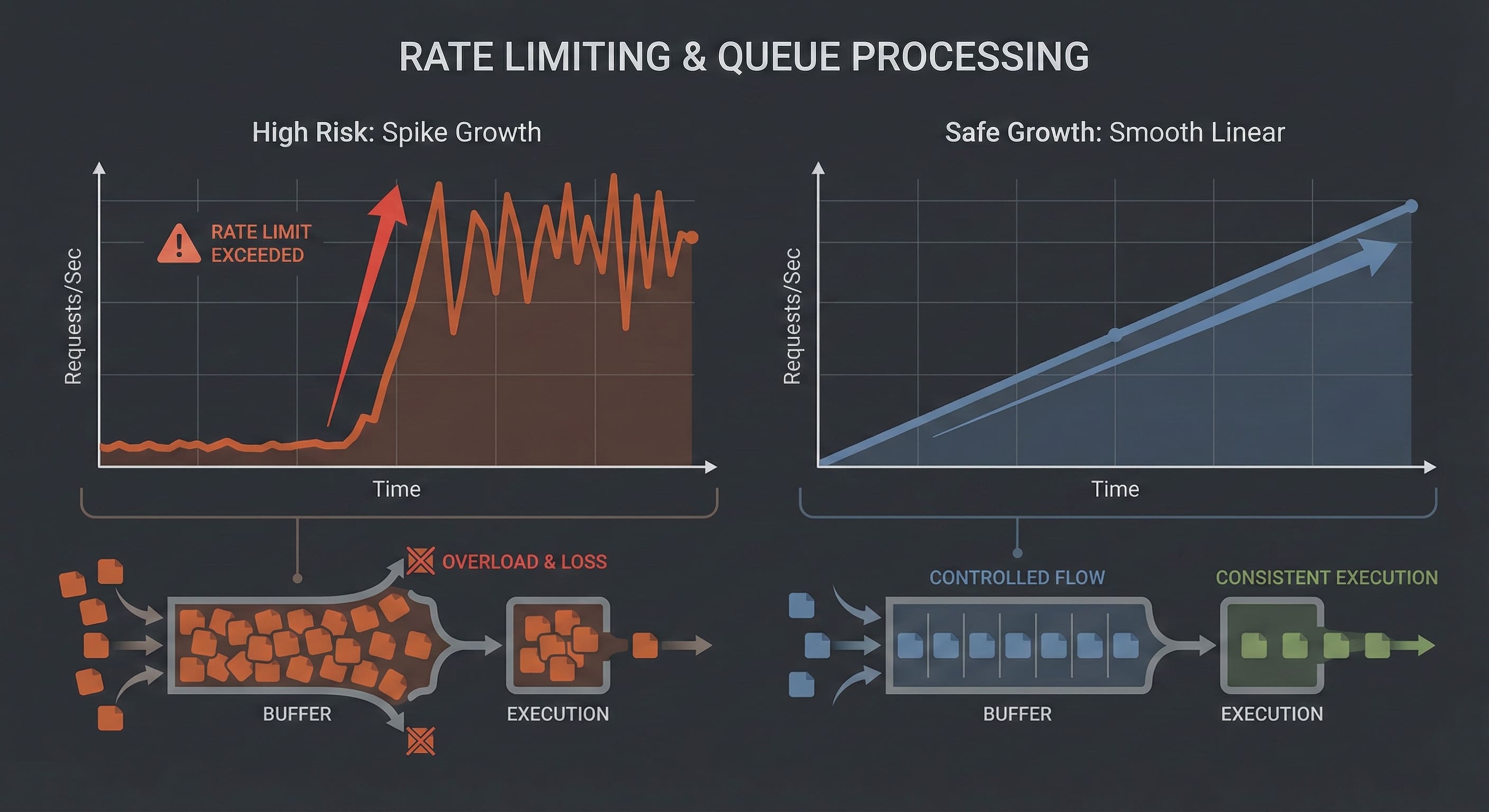
Visualization of rate limits and queue-based execution in an SMM Panel system

The biggest fear for new users is account suspension. It is important to understand: Platforms do not ban you for using a panel. They ban you for anomalous behavior.

Algorithms look for mathematical deviations, not the source of the traffic.

The Red Zone (Errors):

Velocity Spikes: An account created yesterday suddenly gains 50,000 followers in one hour. This triggers automated flags. ❌ Empty Profiles: Traffic is directed to a profile with no avatar and no content. ❌ Metric Imbalance: A post has 10,000 likes but 0 views and 0 impressions. This is mathematically impossible in an organic environment.

The Green Zone (Best Practices):

Smooth Curves: Use "Drip-Feed" or low-speed services. Growth should look linear, not vertical. ✅ Complexity: Mix different signal types. Likes should be 5–10% of Views. ✅ Gradual Scaling: Start small to test the platform’s reaction before scaling up.

The Golden Rule: Operations should remain within the plausible limits of human behavior. Slower is safer.


7. Troubleshooting: When Things Wait

Since this is technical infrastructure, latency and errors occur. This is operational reality.

  • Status "Pending" for a long time:

    • Cause: The server queue is full, or the upstream provider is undergoing maintenance.

    • Action: Wait. The system will either execute the order when capacity opens or cancel it and refund the balance.

  • Status "Partial":

    • Cause: The server delivered a portion of the request (e.g., 500 of 1,000) but could not complete the rest due to updated platform limits.

    • Action: You are charged only for the delivered amount. The remaining funds return to your balance. You can try a different server.

  • Status "Canceled":

    • Cause: Broken link, private profile, or geo-restrictions.

    • Action: Check your profile settings (it must be Public) and link format.


A Tool, Not Magic

An SMM Panel is a powerful automation utility. It removes manual labor, standardizes execution, and provides control over volume.

However, it has strict boundaries:

  1. It provides Infrastructure, not Marketing Strategy.

  2. It delivers Numbers, not Loyalty.

  3. It is an Assistant, not a replacement for high-quality content.

Treat the panel like an engineer: read the technical descriptions, respect the rate limits, and always test on small volumes before deploying large-scale campaigns.

قراءة المزيد

ترويج القنوات على تطبيقات المراسلة.

تعزيز القنوات على تطبيقات المراسلة ليس بالأمر الصعب كما يبدو. بفضل بوابة SmmPanelUS المريحة - موقع ويب خاص لتوفير خدمات الترويج عبر وسائل الإعلام الاجتماعية. من السهل جدًا أن تحصل على متابعي تيليغرام مجانيين بسرعة وبدون أي استثمارات. لماذا هذا ممكن؟ هنا ، يتم تحفيز العملاء الجدد والترحيب بهم برصيد مكافآت للترويج عبر وسائل الإعلام الاجتماعية. كيف يعمل زيادة المشتركين السريعة والمجانية في تيليغرام؟ إنه بسيط - باستخدام المكافآت من منصة الترويج عبر وسائل التواصل الاجتماعي SmmPanelUS. المزود معروف بموثوقيته وسخاءه تجاه مستخدميه. يحصل العملاء الجدد على رصيد كمحفز للاستخدام في تعزيز وسائل التواصل الاجتماعي. لا توجد نفقات مطلوبة - فقط قم بطلب أمر اختبار لبدء زيادة المشتركين السريعة والمجانية في تيليغرام. يمكن لجميع الوافدين الجدد الحصول على مثل هذا الرصيد من خلال تذكرة أو طلبه على تيليغرام. إنه سهل ومجاني ومريح. الأهم من ذلك ، يعمل كدليل على فعالية مجموعة الخدمات المقدمة من لوحة التحكم SMM SmmPanelUS. بعد تحقيق نتائج جيدة ، يمكنك الاشتراك بثقة - خدمات SMM حقًا موثوقة.

تعزيز القنوات على تطبيقات المراسلة

قراءة المزيد

تم تعطيل حساب Discord: الأسباب والحلول

هل تخطط للدردشة مع الأصدقاء، لكن بدلاً من الترحيب الحار، يُرحب بك ديسكورد بإشعار بتعطيل الحساب؟ لا تقلق، دعنا نُحل المشكلة. المحتويات: كيفية التحقق مما إذا كان حسابي مُعطل؟ الأسباب المحتملة للحظر ماذا يمكنك فعله؟ كيفية التحقق مما إذا كان حسابي مُعطل؟ التعرف على تعطيل حسابك أمر بسيط: سيُبلغك ديسكورد برسالة حمراء عند تسجيل الدخول وسيُرسل إشعارًا بالحظر إلى بريدك الإلكتروني. في بعض الأحيان أثناء استخدام ديسكورد، قد تسجل خروجًا من حسابك، ويصبح العودة مستحيلة. الأسباب المحتملة للحظر مثل أي خدمة، يتمتع ديسكورد بقواعد خاصة به، وانتهاكها يمكن أن يؤدي إلى تعطيل الحساب أو حذفه. عند إنشاء حساب جديد على ديسكورد، نتفق على عدم: نشر محتوى غير مرغوب فيه؛ القيام بأنشطة جنائية؛ إرسال رسائل مباشرة غير مرغوب فيها أو دعم العملاء؛ إساءة استخدام نظام الإبلاغ؛ نشر الفيروسات؛ التحرش بالمستخدمين؛ الترويج للعنف والقسوة والانتحار والمازوشية؛ اختراق حسابات المستخدمين؛ انتهاك حقوق التأليف والنشر. انتبه، حتى شيء بسيط مثل عدة محاولات خاطئة لإدخال كلمة المرور يمكن أن يؤدي إلى تعطيل الحساب. اقرأ المزيد عن إرشادات المجتمع على موقع ديسكورد. ماذا يمكنك فعله؟ إذا لم تنتهك إرشادات المجتمع، فمن المرجح أن يتم تعطيل حسابك عن طريق الخطأ. يمكنك التواصل مع دعم ديسكورد وتقديم استئناف للتعطيل: انتقل إلى صفحة الدعم عبر الرابط لتقديم طلب. في القائمة المنسدلة، اختر "الثقة والأمان". أدخل عنوان بريدك الإلكتروني. في القائمة المنسدلة التالية، اختر "الاستئنافات، تحديث العمر، أسئلة أخرى". وأخيرًا، اختر "شكوى بشأن إجراءات ضد حسابي أو البوت". قم بتعبئة الموضوع والوصف، ثم انقر على "إرسال". تمامًا! قد يستغرق عملية المراجعة من 24 ساعة حتى أسبوع. لا تقلق، ديسكورد سيُرسل لك بالتأكيد ردًا! إذا كنت قد انتهكت قواعد ديسكورد، فإن فرص استرداد الحساب ضئيلة جدًا. ليس هناك شيء أكثر حزنًا من فقدان القنوات، ولكن بدلاً من الشعور بالحزن، من الأسهل إنشاء حساب جديد.

الحساب في ديسكورد معطل: الأسباب والحلول

قراءة المزيد

كيفية إعداد بوت الترجمة في ديسكورد؟

على الرغم من وجود جمهور دولي واسع، فإن خدمة التواصل الشهيرة Discord لا تحتوي على مترجم مدمج خاص بها. ومن الحسن حظنا أن هناك بوت خاص يدعم أكثر من 100 لغة مختلفة. الآن، دعنا نشرح كيفية تثبيته وربطه بقناة في Discord.

المحتويات:

  • كيفية تثبيت بوت مترجم Discord؟
  • بدائل مترجم Discord

كيفية تثبيت بوت مترجم Discord؟

إنه سهل، ما عليك سوى اتباع التعليمات:

  1. انتقل إلى موقع المترجم الرسمي.
  2. اختر "جرب مجاناً" وقم بتسجيل الدخول إلى حسابك على Discord.
  3. منح البوت الوصول إلى أقسام الحساب اللازمة.
  4. سيتم فتح قسم الإعدادات. اختر القناة في اللوحة اليسرى لربط البوت.
  5. تأكد من أنه يمكنك إضافة البوت إلى القناة وانقر على "تثبيت البوت" (إذا كنت مسؤول القناة، لن يكون هذا الخطوة مشكلة).
  6. اعتمد البوت لإنشاء الأوامر على الخادم ومنحه الأذونات اللازمة.

منتهى! يمكنك الآن البدء في الترجمة. في لوحة الإعدادات، يمكنك اختيار لغة القناة الافتراضية وتكوين الترجمة التلقائية. البوت يمكنه أيضًا التفاعل مع علامات التعبير: جرب اختيار علم روسي في الردود، وسيقدم البوت الترجمة اللازمة.

يقوم بوت المترجم بعمل رائع في مهمته، على الرغم من أنه يدعي عدم قدرته على خبز فطيرة أو رواية الحكايات قبل النوم. العيب الوحيد هو أن البوت مدفوع جزئيًا فقط. إذا لم تكن على استعداد لدفع 10 دولارات للخطة الأساسية، فهناك بدائل أخرى.

بدائل مترجم Discord

بالإضافة إلى بوت المترجم المقترح، هناك بدائل مجانية. قد تختلف في الوظائف ولكنها تستحق النظر أيضًا. أي واحدة تختار تعتمد عليك. فيما يلي قائمة بأكثرها شيوعًا:

  • Smoogle Translate - بوت مترجم مجاني بوظائف مشابهة جدًا: يقدم الترجمة التلقائية أو باستخدام علامات التعبير.
  • Rita Bot - بوت مترجم مجاني بنسبة 100٪ تم إنشاؤه من قبل مجتمع الألعاب. يمكنك تمكين الترجمة التلقائية لجميع رسائل القناة أو استخدام الأوامر.

عادةً ما تستخدم هذه البوتات تقنية Google Translate للترجمة، لذلك فهي لا تختلف كثيرًا في الجودة. قد تحتوي على ميزات مختلفة، لذلك إذا لم يلبي أحد البوتات متطلباتك، يمكنك تجربة بوت آخر. إذا كان لديك أي أسئلة حول كيفية تثبيت المترجم في قناة Discord الخاصة بك، فلا تتردد في كتابتها في التعليقات، وسنحاول المساعدة!


How to Set Up Discord Translator Bot

قراءة المزيد

هل يمكن لجميع المستخدمين الوصول إلى الخوادم؟

ما هي الخوادم المستضافة؟ هل الخوادم متاحة لجميع المستخدمين؟

يستفسر العديد من الأشخاص عن الانضمام إلى المجتمعات الجديدة والشهيرة على الموقع. عادةً ما يتم تتبع عنوان URL المقدم وتعيين معرف جديد للقناة المُنشأة. يمكن تجنب التكرارات وضمان تصفح مريح. لذا، تعرف على الخوادم وتعلم كيفية الاتصال بها.

ما هو تلك الرابط الغامض ولماذا يُحتاج إليه؟ أولاً وقبل كل شيء، دعنا نفهم كيفية استخدام رابط Discord لاكتشاف الخوادم. في الواقع، إذا تبعت العنوان المقدم، فإنه سيفتح موقع مسنجر Discord الرسمي مباشرةً، ولكن المجال الخاص به سينتهي بـ com. لماذا يحدث هذا؟ على الأرجح، يتم استخدام العنوان الرئيسي بشكل خاص للقنوات، وبالتالي تنسيقه على هذا النحو.

أشهر الخوادم هنا

من المعروف أن Discord (https://discord.gg/) يحتوي على عدة أوامر تم إنشاؤها، مما يجعل من المستحيل تقريبًا سردها جميعًا. لذلك، قررنا تسليط الضوء على القنوات الرئيسية الأكثر شهرة. يمكنك العثور عليها في قائمة مع وصفها التالي:

  • /passiflower - مجموعة روسية تضم محبي لعبة Among Us. تحتوي على حوالي 80,000 مشارك، وعددهم يزداد باستمرار. يمكنك تشكيل فريق والعثور على أصدقاء للتواصل والترفيه.
  • /animeru - فريق من محبي الأنمي. يوجد حاليًا 140,000 مستخدم، ويمكن للجميع المشاركة. الأهم من ذلك، يحدث كل التواصل حصريًا باللغة الروسية.
  • /fdQk6D7SXX - خادم للتواصل الصوتي والألعاب. وفقًا لمُنشئيه، يمكن أن يكون أكثر من 300 شخص في الدردشة الصوتية في نفس الوقت.
  • /G3eNESt - خادم مخصص للعبة Roblox الشهيرة. يحتوي على حوالي 73,000 عضو، ولافت للانتباه أنه يرأسه المدون الشهير زينياشا.
  • /9sjzmvy - صفحة مدرسة تمبوف متوسطة الحجم.
  • /genshimpact - Genshin Impact - أكبر خادم يتحدث باللغة الروسية الذي يجمع عددًا كبيرًا من اللاعبين. إذا انضممت إلى هذه المجتمع، فسوف تجد بسرعة أفرادًا يشاركونك نفس الاهتمامات والمعارف.

كن مراقبًا!

إذا كنت ترغب في تنزيل برنامج Discord على جهاز الكمبيوتر الخاص بك، ما عليك سوى زيارة الموقع الرسمي - وتخمين ماذا؟ على الصفحة المفتوحة، انقر على العبارة "تحميل" وقم بتثبيت البرنامج.

إذاً، لقد نظرنا في أشهر خوادم Discord. بعد ذلك، قد يتم عرض أي قيمة، سواء كانت pzfbtvm أو grsvcg2 أو حتى gdsgwrr. تمثل هذه التركيبة مُعرِّفًا فريدًا يتم تعيينه لكل قناة. لمزيد من المعلومات، يمكنك استخدام موقع المراسل الرسمي. هل لديك أسئلة أخرى حول موضوع المقال؟ لا تتردد في طرحها في التعليقات!


Are Servers Accessible to All Users?

قراءة المزيد

كل شيء عن Discord API: ما هو وكيفية التثبيت

البوتات والتطبيقات هي روح مجتمع مطوري Discord. يأتون بجميع الأشكال والأحجام، من مشاريع الهواة الصغيرة للخوادم الشخصية مع الأصدقاء إلى المشاريع الضخمة التي تعيش على مئات آلاف الخوادم. إن إنشاء مشروع خاص بك لا يتطلب خبرة كاملة في تطوير التطبيقات. هناك العديد من الأدوات الجاهزة التي يمكن أن تساعدك في التطوير. يقدم Discord API المطورين واجهة برمجة التطبيقات المفتوحة للبوتات. دعونا نلقي نظرة أقرب على ما هو Discord API.

المحتويات:

  • ما هو Discord API وأين يمكن العثور عليه؟
  • كيفية الاتصال بـ Discord API؟
  • كيفية إضافة الترخيص لـ Discord إلى موقعك؟

ما هو Discord API وأين يمكن العثور عليه؟

إن Discord API هو جزء من خادم Discord الذي يستقبل الطلبات ويُرسل الردود. يحتوي على جميع وظائف التطبيق، مما يتيح لك إضافة ترخيص Discord إلى موقعك أو الاتصال بوت مساعد بخادمك. للحصول على معلومات مفصلة حول Discord API، يمكنك الرجوع إلى موقع مطوري Discord. العيب الوحيد هو أن جميع الوثائق والتعليمات باللغة الإنجليزية. لاستخدام Discord API في تطوير البوتات، تحتاج إلى الحصول على رمز يتألف من الحروف والأرقام. يعمل هذا الرمز كـ "مفتاح" للتحكم في البوت، حيث يرسل طلبات ويستقبل الردود. الآن، دعونا نتعرف على كيفية الحصول عليه.

كيفية الاتصال بـ Discord API؟

إن إنشاء رمز برمجي بسيط. اتبع التعليمات الخطوة بخطوة:

  1. انتقل إلى صفحة موقع مطوري Discord وقم بتسجيل الدخول إلى حسابك.
  2. اختر قسم "Applications" وانقر على "New Application".
  3. اختر اسمًا لبوتك. على سبيل المثال، قمنا بتسمية البوت "New Discord Bot".
  4. في اللوحة اليسرى لموقع مطوري Discord، حدد علامة التبويب "Bot" ذات رمز قطعة اللغز.
  5. في القسم المفتوح، انقر على "Add Bot". ستظهر نافذة تأكيد، انقر على "نعم، قم بذلك!".
  6. ستظهر مستطيل أخضر مع نص "ظهر بوت بري" مما يشير إلى أنك قمت بكل شيء بشكل صحيح. سيظهر الرمز البرمجي على الصفحة، يمكنك عرضه بالنقر على "Click to Reveal Token"، ونسخه بالنقر على "Copy". الرمز البرمجي جاهز، وقد قمت بتوصيل البوت بـ Discord API بنجاح. الآن، يمكنك المتابعة في تطوير البوت من خلال البحث عن "create discord bot tutorial" للعثور على العديد من الدروس، وعادة باللغة الإنجليزية.

كيفية إضافة الترخيص إلى موقعك عبر Discord؟

يتطلب من المطورين على المنتديات الروسية والأجنبية غالبًا الاستفسار عن ذلك. هناك أيضًا العديد من الأدوات التي تم إنشاؤها لتبسيط هذه المهمة. في اللوحة اليسرى لموقع مطوري Discord، حدد علامة التبويب "OAuth2". لمزيد من المعلومات حول الترخيص عبر Discord في تطبيقك، اقرأ الروابط التالية:

  • مثال Python على GitHub: https://github.com/discord/discord-oauth2-example
  • مثال Discord JavaScript: https://github.com/discord/discord-oauth2-example

لقد قمنا بتغطية كل شيء عن Discord API وكيفية الاتصال به. نأمل أن يساعدك مقالنا في تطوير البوت أو التطبيق. إذا كان لديك أي أسئلة حول موضوع Discord API، فلا تتردد في كتابة تعليقات!

https://storage.perfectcdn.com/3cu3s8/i1h8ec373m4eo6ky.png

قراءة المزيد

ميزة شحن متجر التطبيقات

ميزة شحن متجر التطبيقات: اشحن جهازك من أجهزة أخرى

تسمح ميزة شحن متجر التطبيقات لك بشحن جهازك من أجهزة أخرى باستخدام تطبيق lîn. صممت لنقل الملفات متعددة الوسائط إلى الهواتف الذكية التي تعمل بنظام Android وتعمل عبر تقنية البلوتوث. سنرشدك حول كيفية إعداد واستخدام هذه التكنولوجيا.

أولاً، يجب عليك تمكين تقنية البلوتوث والتحكم عن بُعد على هاتفك الذكي. للقيام بذلك، قم بسحب الشاشة من الأعلى واضغط على عدد العناصر في القائمة المظهرة. يجب تفعيل هذا الخيار. ثم، افتح الإعدادات وانتقل إلى قسم "جوجل". اذهب إلى "البيانات ومشاركة البيانات" - "المشاركة القريبة". ثم، قم بتحريك المفتاح إلى وضع التشغيل لتمكين هذه الميزة.

لذا، سواء كنت تتحدث عن الأصدقاء أو المخططات أو الصور أو الروابط، يمكنك استخدامها بحرية. ستتلقى إشعارات وتنبيهات. اضغط على الزر "تم".


ميزة شحن متجر التطبيقات

قراءة المزيد

Android Nearby Share: كيفية عمل ميزة مشاركة البيانات

مشاركة Android بالجوار: كيفية عمل مشاركة البيانات تتيح لك ميزة مشاركة البيانات من Android مشاركة المعلومات من هاتف خلوي إلى آخر. يتم توفيره لقناة اتصال من Android إلى Android ويعمل عبر Bluetooth. دعونا نناقش بإيجاز هذا التحكم بمساعدة هذا الابتكار. كيفية تشغيل ميزة مشاركة الأجهزة القريبة Android عادة ما يتم تنشيطه من خلال إجراءات مختلفة. كل ما تحتاجه هو هاتف يعمل بنظام Android 6 أو أعلى والخيارات المناسبة. أولاً ، قم بتشغيل Bluetooth والموضع الهندسي على الجهاز. بعد ذلك ، اسحب لأسفل من أعلى الشاشة ، حيث يتم عرض بعض الرموز في العنصر المعروض الذي يتم تشغيله. ثم انتقل إلى الخيارات وانتقل إلى Google ، الموجود في الأسفل. انتقل إلى الكتلة "تبادل الأجهزة والبيانات" - "التبادل مع البيئة". ثم حرك شريط التمرير إلى الحالة المكثفة لتنشيط ناجح. كيفية مشاركة المعلومات مع المستخدمين الآخرين عند إرسال البيانات إلى أصدقائك ، على سبيل المثال ، الصور والروابط وغيرها ، ستحتاج إلى خيار "المشاركة مع البيئة". تذكر أن المستخدم الثاني موجود دائمًا بالقرب منك ، حيث يتم إرسال جميع البيانات عبر البلوتوث. افتح ملفًا لإرساله ، على سبيل المثال ، صورة في معرض الصور الخاص بك. انقر فوق الزر "مشاركة" في الجزء السفلي من الشاشة. سيكون هناك تبادلات مختلفة. انقر على الزر الرمادي: "تبادل مع البيئة". فأنت بحاجة إلى هاتفين خلويين لمسافة قصيرة مع بعضهما البعض. في قسم "البحث عن الأجهزة المجاورة" ، حدد هاتف الشخص الثاني من أجل تبادل المعلومات. يقوم مستخدم الجهاز الثاني بتأكيد طلبه واستلام الملف ، وسيتم حذف احتمالية أن تكون معلوماتك لأطراف ثالثة. عندما تظهر الرسالة "تم الإرسال" ، سيتم إرسال ملفك. أخيرًا ، انقر على "تم" وارجع إلى القائمة الرئيسية.

Android Nearby Share: how the sharing feature works


قراءة المزيد

كيفية إعادة تشغيل أي طراز من طرز الآيفون

المستخدمون يمازحون غالبًا بأنه لحل أي مشكلة في الهاتف، كل ما عليك فعله هو إيقافه ثم تشغيله مرة أخرى. في الواقع، يمكن أن يساعد إعادة التشغيل في حل الكثير من المشكلات إذا كان جهاز الآيفون الخاص بك يتصرف بشكل غريب. إنه أمر بسيط جدًا للقيام به، ولكن طرق إعادة تشغيل طرازات الآيفون مختلفة. في هذه المقالة، سنلقي نظرة على كيفية إيقاف التشغيل وإعادة تشغيل الآيفون من طرز 7 و 8 و X و 11 و 12. إيقاف آيفون 7 إيقاف آيفون 7 وجميع الطرز السابقة له بسيط جدًا. ما عليك سوى اتباع هذه الخطوات: اضغط واستمر في الضغط على زر التشغيل على الجانب الأيمن من الهاتف (أو الجزء العلوي في الإصدارات السابقة) لبضع ثوانٍ. ثم، اسحب الزر "إيقاف التشغيل" الظاهر على الشاشة لإيقاف تشغيله. ستصبح شاشة الهاتف غير نشطة ولن تستجيب للمس. هذه الطريقة مريحة جدًا، وستُحفظ جميع التطبيقات والعلامات المفتوحة الخاصة بك. في حالة عدم استجابة الشاشة للتمرير، ستحتاج إلى إجراء إعادة تشغيل قسرية. سيتم حفظ بياناتك، ولكن سيتعين إعادة فتح التطبيقات المغلقة. كيفية إجراء إعادة تشغيل قسرية: بالنسبة للطرازات الأقدم من آيفون 7، اضغط واستمر في الضغط على زر القفل وزر "الرئيسية" معًا. بالنسبة لآيفون 7، اضغط واستمر في الضغط على زر خفض مستوى الصوت على اللوحة اليسرى وزر القفل معًا. استمر في الضغط على الأزرار لمدة 5-7 ثوانٍ تقريبًا، وسيتم إيقاف تشغيل الآيفون. إيقاف آيفون 8 كان الطراز الثامن في تشكيلة الآيفون معروفًا بأنه يسبب مشاكل ويتطلب غالبًا إجراء إعادة تشغيل. تم حل العيوب، ولكن من المفيد معرفة كيفية إعادة تشغيل الآيفون 8 في حالات الطوارئ. يمكنك فعل ذلك عن طريق الاستمرار في الضغط على زر التشغيل أو باستخدام أحد الطرق التالية: في قسم "الإعدادات"، ابحث عن "إيقاف التشغيل" في الأسفل، اضغط عليه واسحب المنزلق. ستوفر لك هذه الطريقة في حالة عدم عمل زر القفل. إعادة تشغيل قسرية: اضغط على زر زيادة مستوى الصوت وأفلته، ثم اضغط على زر خفض مستوى الصوت، وأخيرًا، استمر في الضغط على زر القفل. أفلت الزر بمجرد ظهور شعار أبل. هذه الطريقة مناسبة إذا كان شاشتك لا تستجيب للمس. إيقاف آيفون 10، 11، 12، 13 طرز آيفون الحديثة تختلف كثيرًا عن سابقاتها، ولن يمكن إيقاف تشغيل الهاتف الذكي بالطريقة المعتادة. هناك طريقتين لإيقاف آيفون X وطرازات أحدث: من خلال قسم "الإعدادات"، بشكل مشابه لآيفون 8. في الإعدادات العامة، حدد "إيقاف التشغيل" واسحب المنزلق. باستخدام ميزة "استدعاء الطوارئ"، اضغط على زر القفل وأحد أزرار مستوى الصوت حتى تظهر المنزلقات. كيفية إيقاف آيفون بدون أزرار تعمل هذه الطريقة على جميع الطرازات من آيفون 5S والأقدم. عندما لا تعمل الأزرار على الهاتف الذكي، قد يكون من الصعب استخدامه. يمكن حل هذه المشكلة باستخدام ميزة الوصول. لتمكين هذه الميزة، اتبع هذه الخطوات: ابحث عن "الوصول" في الإعدادات. افتح قسم "اللمس" أو "لمسة مساعدة". انقل المفتاح إلى اليمين لتمكين الوظيفة. ستظهر زرًا صغيرًا على الشاشة. اضغط مرتين على الزر واختر "الجهاز" -> "المزيد" -> "إعادة التشغيل" في القائمة. انتظر حتى يتم إيقاف تشغيل الجهاز. كيفية إيقاف آيفون بدون شاشة تعمل الطرازات الحديثة من آيفون بأزرار فيزيائية قليلة، ويمكن أن يكون إيقاف تشغيل الهاتف الذكي صعبًا إذا كانت الشاشة مكسورة ولا تستجيب للمس. فيما يلي بعض الطرق التي يمكن تجربتها: إذا كان شاشة اللمس مستجيبة جزئيًا، جرب الاستمرار في الضغط على زر القفل وأحد أزرار مستوى الصوت، ثم اسحب إصبعك أعلى أو أسفل النص في جزء آخر من الشاشة. إذا كانت الشاشة مكسورة تمامًا، جرب إيقاف التشغيل بالمس الأعمى عن طريق تمرير إصبعك على الجزء السفلي من الشاشة. إذا لم تنجح هذه الطرق، يمكنك الانتظار حتى يفرغ البطارية، ثم قم بإعادة توصيل آيفون بمصدر الطاقة لإعادة التشغيل. ومع ذلك، إذا كانت أزرار هاتفك الذكي مكسورة أو الشاشة مكسورة، فسيكون عليك في النهاية زيارة مركز خدمة.

كيفية إعادة تشغيل أي طراز من آيفون

قراءة المزيد

About the SmmPanelUS blog

The blog is where the team writes things down: short, practical notes on running the platform, working with the catalog, and getting more out of the tools and the API. Posts lean toward the how and the why — placing an order cleanly, reading a status, wiring the API into your own front — rather than announcements for their own sake.

It's written for the people who actually use the platform: creators planning a campaign, businesses keeping a presence steady, and resellers or developers building on top. Where a piece needs a formula or a code sample, it gets one; where a plain paragraph is enough, that's what it stays.

New pieces appear when there is something worth saying, not on a quota. If you're weighing whether the platform fits your work, the posts here are a fair way to see how it thinks before you create an account.

يُفتح الكتالوج بالدخول
الوصول عبر الحساب
إنشاء حساب