सामग्री पर जाएँ
Notes & updates

Blog

Short pieces on the platform, the tools, and working with the catalog — no noise, no promises, just the practical bits.

Safe SMM Panel Architecture: Algorithms, Risk Factors, and Ban Prevention (2026)

In 2026, social media algorithms no longer react solely to quantitative metrics. They now analyze behavioral patterns, growth Velocity, and Connectivity Scores. Any sharp deviation from a "standard" user profile triggers security protocols, ranging from shadowbans to permanent blocks. The market for SMM infrastructure has shifted: brute-force methods from 2019 are obsolete.

Resellers and agencies often search for a "magic solution," ignoring the technical reality. A safe SMM panel is not a marketing slogan; it is a specific configuration of server settings, proxy types, and database quality. Understanding this backend architecture reduces the probability of account loss from 90% to a statistical margin of error. SmmPanelUS operates as a SaaS infrastructure to provide these tools, but the strategy remains in the hands of the user.

Briefly: Absolute protection does not exist in the API market. Safety is the management of probabilities through Speed settings, Drip-feed delivery, and the selection of verified (HQ/Real) databases. Cheap services without guarantees (No Refill) always carry a higher risk coefficient.

Technical Architecture: High Risk vs. Safe Tier

The term "safety" in the context of API services is often technical. Risks are generated by the social network's algorithms, not the panel itself. The primary difference between a secure infrastructure and a mass-market tool lies in the quality of assets and the proxying method.

The table below compares technical implementations:

ParameterMass Market (High Risk)Safe Infrastructure (SaaS Tier)
IP TypeDatacenter IP (Cheap server proxies, often blacklisted)Residential / Mobile 4G Proxy (Simulates real user devices)
Account Age0-14 days (Newly registered)6+ months (Aged Accounts with history)
Profile QualityZero-post (Empty bio/avatar)Filled bio, avatar, posts, stories
Start SpeedInstant (Causes velocity spikes)Randomized Delay (0-1 hour)

The myth of "100% ban protection" fails against the reality of code updates. Reliable infrastructure minimizes risks but does not control the moderation policy of external platforms.

Risk Calculation and Detection Math

Ignoring API limits and using Low Quality databases triggers automatic filters. Algorithms often use a variation of the Risk Factor formula:

$$Risk_{factor} = \frac{Artificial\_Activity}{Organic\_Baseline} \times Velocity$$

Here, Organic Baseline represents the account's historical activity, and Velocity is the speed of the incoming traffic. If the numerator increases while the denominator (the base audience) remains small, a flag is raised.

Sanction Types and Triggers

  • Drops (Removals): The platform deletes bot accounts. Services marked "Non-Drop" or "R30" (Refill 30 days) include a recovery buffer, whereas cheap databases burn out completely.
  • Shadowban: The account disappears from search results and the "Explore" page. This occurs when engagement metrics are unbalanced (e.g., 10,000 likes with only 50 reach).
  • Action Block: A temporary restriction (24–72 hours). This is triggered by exceeding API limits (e.g., >60 actions per hour for a fresh account).

Identifying a Safe SMM Panel

Professionals analyze the technical specifications in the API documentation or service descriptions before placing orders.

1. Service Specifications (Specs)

A transparent service card lists technical limits:

  • Start Time: A logical delay often indicates a managed queue rather than server overload.
  • Speed/Day: Explicit daily limits (e.g., 500-1000/day) allow for precise load planning.
  • Refill Button: The presence of an auto-refill function signals that the database is maintained and replenished.

2. Drip-feed Functionality

This feature is critical for safety. Drip-feed (Feature) breaks a large order into smaller micro-transactions (Advantage), smoothing the statistical graph to mimic a Natural Curve and bypassing velocity filters (Benefit).

3. Automated Refund Policy

Reliable infrastructure automates cancellations. If a social network update prevents delivery (Status: Partial), funds return to the balance. Systems that retain funds during failures indicate instability.

The Error Matrix: Why Accounts Fail

Analysis of support tickets shows that most issues stem from strategy, not the tool. Below are common patterns that lead to asset loss.

User ActionTechnical ConsequenceResult
Ordering 10k followers on a 1-day old accountVelocity Spike of 5000% above baselineInstant Ban or Drop
Buying the cheapest services ($0.001)Usage of IPs from public blacklistsAction Block + Removal
Concurrent orders from 2-3 different panelsCounter conflicts and request overloadPartial Status, Money Loss, High Risk
Buying Likes without Reach/ImpressionsAbnormal ER (Engagement Rate > 100%)Shadowban (Algorithmic suppression)

Risk Mitigation Protocols

Working with SMM infrastructure requires a systematic approach. Safety is the result of calculation.
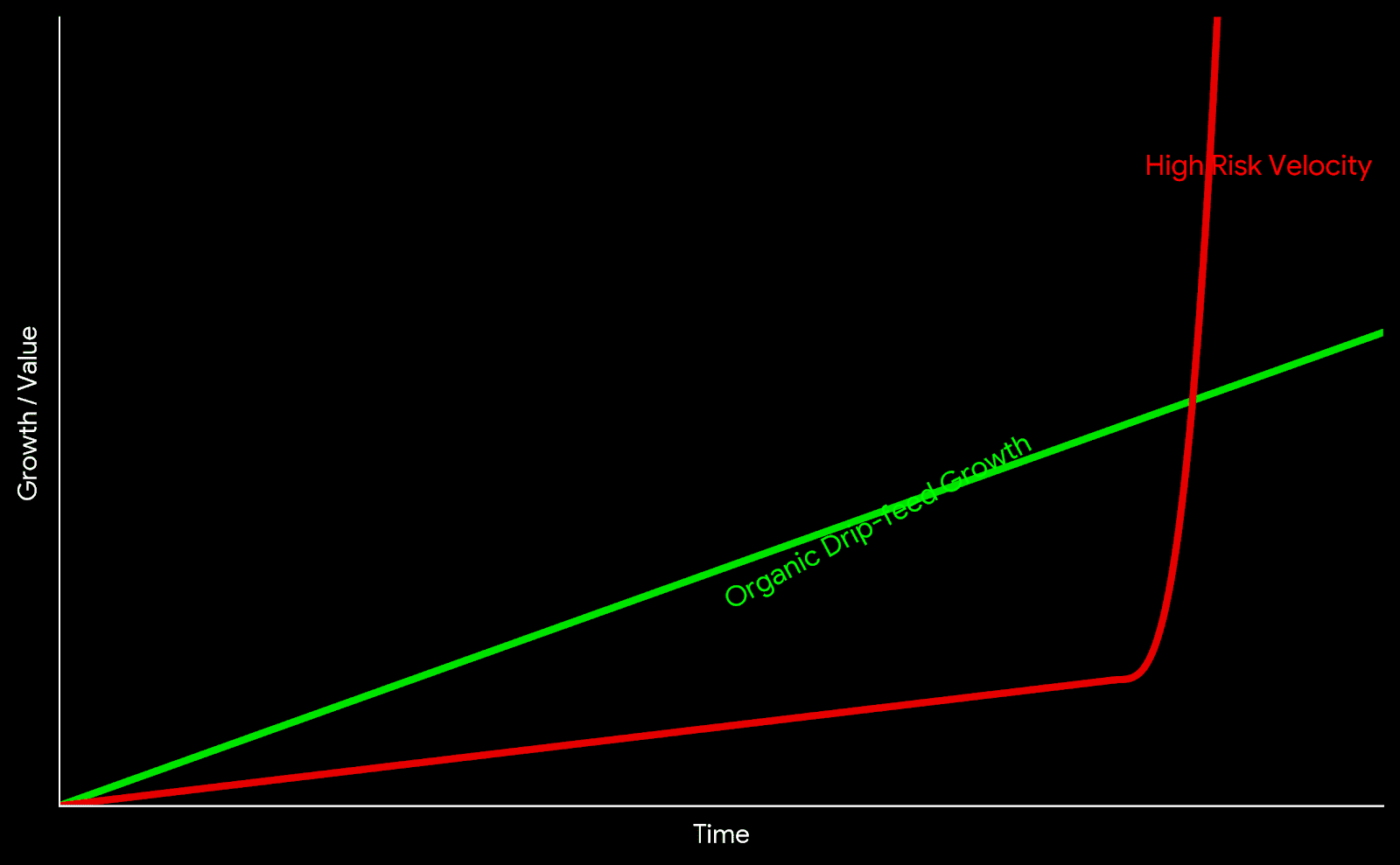
Chart comparing high risk velocity spikes versus organic drip-feed growth
Visualizing the difference between Velocity Spikes and Organic Growth patterns.

The "Warm-up" Protocol

For new accounts (under 3 months), professionals apply a progressive load scale:

  • Week 1: Organic posting, phone/email verification. Zero external services.
  • Week 2: Drip-feed at minimum speed (20-50 units/day).
  • Week 3: Increase limits to 100-200 units/day.
  • Month 2+: Transition to standard operational volumes.

The Sandbox Method (Testing)

Experienced resellers maintain "Sandbox" accounts—test profiles used to verify Service IDs before applying them to main projects. If a Sandbox account receives an Action Block or a Drop, the service is marked as risky and excluded from Tier-1 campaigns.

Safety Checklist

  • Service type verified as Real or HQ (Priority over Mixed/Bot).
  • Refill guarantee active (30/60/365 days).
  • Daily speed limits checked in description.
  • Test order completed on a Sandbox account.
  • Drip-feed configured (if available).
  • Account has organic activity (posts, stories) prior to start.

Conclusion

Safety in SMM automation is dynamic. Platforms like SmmPanelUS provide access to global infrastructure, but the user defines the application strategy. Choosing services with guarantees (Refill), using Drip-feed to manage velocity, and avoiding the cheapest market options ($0.01 per 1k) form the foundation for stable operations.

FAQ

Can an account get permanently banned for SMM services?

Yes, if violations are systematic and the account receives "Spam Reports" from real users. Isolated limit breaches usually result in temporary Action Blocks or follower removal (Drops).

What is Drip-feed and why use it?

Drip-feed is an automation feature that splits a single order into multiple smaller deliveries (e.g., 50 likes every 30 minutes). This creates a natural growth curve that is harder for algorithms to detect.

Why are expensive services considered safer?

Higher costs typically reflect the maintenance of high-quality account databases (with avatars, posts, history) and the use of residential 4G proxies, which bypass standard anti-spam filters.
Read more

SMM Panel: A Complete Guide to Architecture, Logic, and Operations

The digital marketing market often operates with abstract terms. What users colloquially call an "SMM Panel", engineers define as an API Request Routing Gateway.

For a student, a junior marketer, or a business owner, understanding this distinction is crucial. It separates those who blindly press buttons from those who understand the underlying mechanics of automation.

This guide analyzes the infrastructure: from the moment a request is created to its actual execution on the server layer.


1. What is an SMM Panel: Dual Definition

To truly understand the tool, we must separate the marketing interface from the technical reality.

The Surface Level (For the User)

An SMM Panel is a web-based marketplace where digital metrics (subscribers, views, interaction signals) are purchased in bulk. It functions like any e-commerce dashboard: you select a category, input a target link, and process a transaction.

The Core Level (For the Engineer)

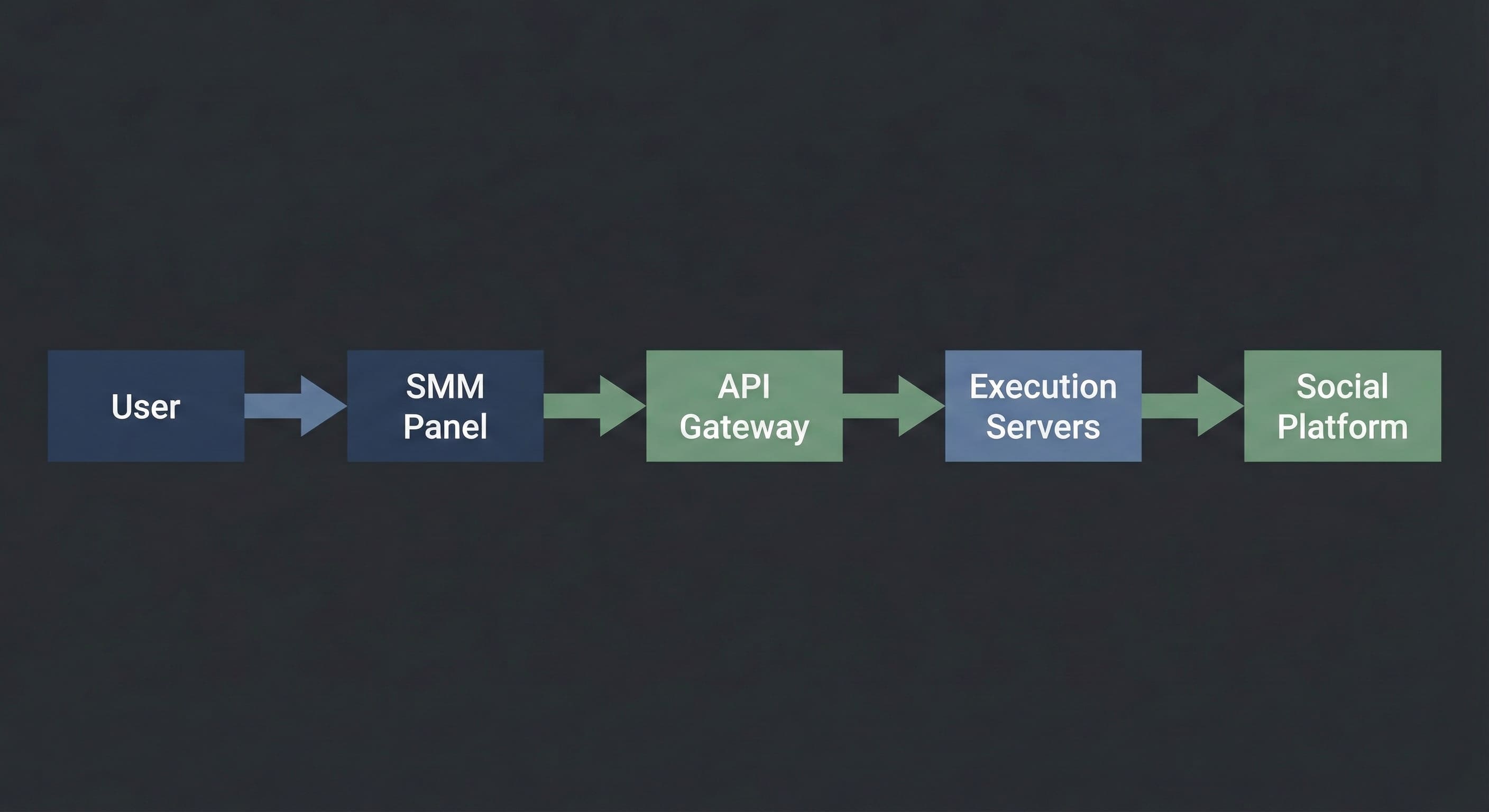
Technically, an SMM Panel is a Control Plane connected via API (Application Programming Interface) to a network of execution servers. The panel does not "generate" the metrics itself. It acts as a dispatcher: it accepts your command, validates the budget, and routes the task to a server with available capacity.

In simple terms: Think of it as a logistics center. You submit a shipping order, and the system decides which truck (server) will transport your cargo (request) and which route it will take.


2. How It Works: Under the Hood

SMM Panel architecture diagram showing user requests routed through an API gateway to execution servers

The execution process is a linear data transmission chain. It remains consistent regardless of the specific interface you use.

[How it looks to you]:

  1. You select a service (e.g., "Telegram Views").

  2. You paste the link to the post.

  3. You specify the quantity (e.g., 1,000).

  4. You click "Submit".

[What happens inside the system]:

  1. Validation: The script checks if the link format is correct and if the user balance covers the transaction cost.

  2. Routing: Your order is assigned a unique ID and transmitted to the API Gateway.

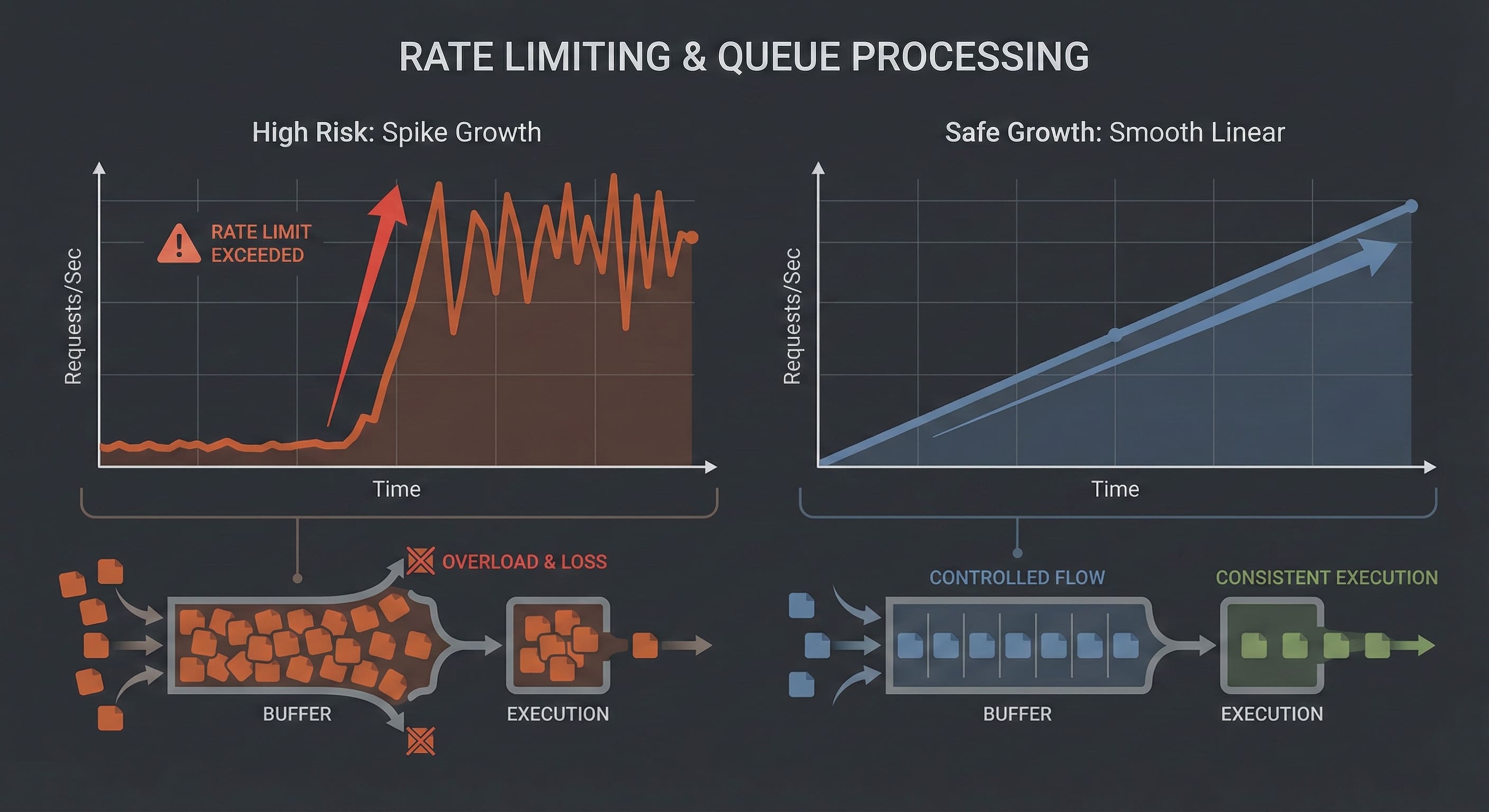
  3. Queue: If the upstream server is available, processing begins immediately. If the server is under high load, the order enters a "Pending" state, waiting for a slot in the execution queue.

  4. Execution: The server initiates the interaction signals according to the script.

  5. Completion: The system receives a "Finished" signal and updates the status to "Completed".

Critical Note: This is not magic. It is a script. It executes exactly what you input. If you provide a broken link or a closed profile, the system may still attempt execution because it does not analyze context—it only processes code.


3. The Dictionary: Industry Terminology

To operate effectively, you must understand the technical vocabulary. Misunderstanding these parameters often leads to budget waste.

  • Start Time: The latency period before execution begins.

    • Instant: Processing starts within 0–5 minutes.

    • 1h / 12h: The task is scheduled for a later window.

  • Speed (Throughput): The maximum number of actions the system can deliver per 24 hours.

    • Example: "Speed 5k/day" means the system will throttle delivery to 5,000 units daily to stay within safety thresholds.

  • Drop Rate: The percentage of metrics that may be removed by the social platform’s cleanup algorithms over time.

  • Refill / Non-Drop: A guarantee feature where the system automatically re-queues lost metrics to restore the original count.

  • Drip-Feed: A scheduling logic that splits one large order into multiple smaller batches.

    • Example: Instead of 1,000 likes at once, you configure "100 likes every 60 minutes". This smoothes the traffic curve to mimic organic behavior.


4. Market Hierarchy: The Supply Chain

The SMM market is structured like a wholesale supply chain. Knowing your position helps you avoid overpaying.

  1. Providers (The Source): These entities own the physical hardware or the software logic that generates the signals. They operate via API only and rarely deal with retail customers.

  2. Resellers (The Panels): These are platforms connected to Providers. They build the user interface, handle customer support, and curate the service list.

    • Note: Approximately 90% of panels on the market are resellers. This is standard. A high-quality reseller adds value by filtering out unstable servers and providing a single access point to multiple sources.

  3. End Users (You): Agencies, freelancers, students, and businesses.


5. Why This Exists: Practical Use Cases

Beginners often mistake these tools for "vanity metrics." Professionals use them for specific infrastructure tasks.

A. Social Proof Engineering

User psychology is linear: people are more likely to follow a channel with 1,000 members than a channel with 5.

  • Goal: Establish a baseline visual authority to lower the barrier for organic subscriptions.

  • Tool: Initial population of counters (subscribers, views).

B. Reputation Management (ORM)

When a brand faces a targeted negative attack, positive or neutral signals can prevent reputational damage.

  • Goal: Balance visibility.

  • Tool: Routing positive signals to neutral comments to displace negativity from the top of the feed.

C. Hypothesis Testing (A/B Testing)

Media buyers often need to test ad creatives. To see if an ad performs, it sometimes needs "pre-heating."

  • Goal: Quickly validate if a creative can gain traction.

  • Tool: Automated interaction signals on ad posts.


6. Safety & Limits: How to Avoid Bans

Visualization of rate limits and queue-based execution in an SMM Panel system

The biggest fear for new users is account suspension. It is important to understand: Platforms do not ban you for using a panel. They ban you for anomalous behavior.

Algorithms look for mathematical deviations, not the source of the traffic.

The Red Zone (Errors):

Velocity Spikes: An account created yesterday suddenly gains 50,000 followers in one hour. This triggers automated flags. ❌ Empty Profiles: Traffic is directed to a profile with no avatar and no content. ❌ Metric Imbalance: A post has 10,000 likes but 0 views and 0 impressions. This is mathematically impossible in an organic environment.

The Green Zone (Best Practices):

Smooth Curves: Use "Drip-Feed" or low-speed services. Growth should look linear, not vertical. ✅ Complexity: Mix different signal types. Likes should be 5–10% of Views. ✅ Gradual Scaling: Start small to test the platform’s reaction before scaling up.

The Golden Rule: Operations should remain within the plausible limits of human behavior. Slower is safer.


7. Troubleshooting: When Things Wait

Since this is technical infrastructure, latency and errors occur. This is operational reality.

  • Status "Pending" for a long time:

    • Cause: The server queue is full, or the upstream provider is undergoing maintenance.

    • Action: Wait. The system will either execute the order when capacity opens or cancel it and refund the balance.

  • Status "Partial":

    • Cause: The server delivered a portion of the request (e.g., 500 of 1,000) but could not complete the rest due to updated platform limits.

    • Action: You are charged only for the delivered amount. The remaining funds return to your balance. You can try a different server.

  • Status "Canceled":

    • Cause: Broken link, private profile, or geo-restrictions.

    • Action: Check your profile settings (it must be Public) and link format.


A Tool, Not Magic

An SMM Panel is a powerful automation utility. It removes manual labor, standardizes execution, and provides control over volume.

However, it has strict boundaries:

  1. It provides Infrastructure, not Marketing Strategy.

  2. It delivers Numbers, not Loyalty.

  3. It is an Assistant, not a replacement for high-quality content.

Treat the panel like an engineer: read the technical descriptions, respect the rate limits, and always test on small volumes before deploying large-scale campaigns.

Read more

मैसेंजर्स पर चैनल के प्रमोशन।

मेसेंजर पर चैनल प्रमोशन वह दिखने से भी कठिन नहीं है जैसा कि लगता है। आसान तौर पर आप SMM सेवाओं के लिए एक विशेष वेबसाइट SmmPanelUS के सहायक के रूप में पाने के लिए धन्यवाद। यह बहुत सुविधाजनक है कि आप बिना किसी निवेश के जल्दी और आसानी से मुफ्त टेलीग्राम सब्सक्राइबर प्राप्त कर सकते हैं। यह कैसे संभव है? यहां, SMM प्रचार प्लेटफ़ॉर्म SmmPanelUS के बोनस क्रेडिट के साथ नए ग्राहकों को प्रोत्साहित और स्वागत किया जाता है। तेज और मुफ्त टेलीग्राम सब्सक्राइबर बढ़ाव कैसे काम करता है? यह सरल है - SmmPanelUS से बोनस का उपयोग करके। प्रदाता अपने उपयोगकर्ताओं के प्रति विश्वसनीयता और उदारता के लिए जाना जाता है। नए ग्राहक सोशल मीडिया को बढ़ाने के लिए उत्साह के रूप में एक शेष राशि प्राप्त करते हैं। कोई भी खर्च आवश्यक नहीं है - बस एक परीक्षण आदेश देने के लिए। तेज और मुफ्त टेलीग्राम सब्सक्राइबर बढ़ाव शुरू करने के लिए सभी नवीनतम कोई इस तरह की राशि प्राप्त कर सकते हैं टिकट या टेलीग्राम पर अनुरोध करके। यह आसान, खर्च-मुक्त और सुविधाजनक है। सबसे महत्वपूर्ण बात यह है कि यह SMM पैनल SmmPanelUS द्वारा प्रदान की जाने वाली सेवाओं के प्रभावशीलता का सबूत है। अच्छे परिणाम प्राप्त करने के बाद आप विश्वास के साथ सदस्यता ले सकते हैं - SMM सेवाएं सचमुच विश्वसनीय हैं।

मेसेंजर पर कैनल प्रमोशन

Read more

डिस्कॉर्ड अकाउंट अक्षम किया गया: कारण और समाधान

दोस्तों के साथ चैट करने की योजना बना रहे हैं, लेकिन वर्म वेलकम की बजाय, डिस्कॉर्ड आपको एक खाता निष्क्रिय बनाने के अधिसूचना से संबोधित करता है? चिंता न करें, चलो समस्या को हल करते हैं। सामग्री: मेरे खाते को निष्क्रिय करने का तरीका कैसे पता करें? अवरोध करने के लिए संभावना कारण क्या करें? मेरे खाते को निष्क्रिय करने का तरीका कैसे पता करें? आपके खाते को निष्क्रिय करने को पहचानना आसान है: डिस्कॉर्ड आपको लॉगिन करने पर एक लाल संदेश द्वारा सूचित करेगा और आपके ईमेल पर एक बैन सूचना भेजेगा। कभी-कभी डिस्कॉर्ड का उपयोग करते समय, आपको खाते से लॉगआउट हो सकता है, और पुनर्प्रवेश असंभव हो जाता है। अवरोध करने के लिए संभावना कारण डिस्कॉर्ड की तरह किसी भी सेवा के नियम होते हैं, और उन्हें उल्लंघन करने से खाते को निष्क्रिय करने या हटाने का कारण बन सकता है। डिस्कॉर्ड पर नया खाता बनाते समय, हम निम्नलिखित कारणों से सहमत होते हैं: अचाहीत विषय वितरित न करना; अपराधिक गतिविधियों में शामिल नहीं होना; सीधे संदेश या ग्राहक समर्थन को स्पैम न करना; रिपोर्टिंग सिस्टम का दुरुपयोग करना; वायरस फैलाना; उपयोगकर्ताओं को परेशान करना; हिंसा, क्रूरता, आत्महत्या, मासोखिज़्म को प्रोत्साहित नहीं करना; उपयोगकर्ता खाते हैक करना; कॉपीराइट कानून का उल्लंघन करना। ध्यान दें, कई बार गलत पासवर्ड प्रयासों की तरह छोटी सी बात भी खाते को निष्क्रिय कर सकती है। डिस्कॉर्ड वेबसाइट पर समुदाय दिशा-निर्देशों के बारे में और अधिक जानें। क्या करें? यदि आपने समुदाय दिशा-निर्देशों का उल्लंघन नहीं किया है, तो आपका खाता संभवतः भूल से निष्क्रिय किया गया था। आप डिस्कॉर्ड समर्थन से संपर्क करके निष्क्रिय करने के खिलाफ अपील कर सकते हैं: अनुरोध प्रस्तुत करने के लिए लिंक के माध्यम से समर्थन पेज पर जाएं। ड्रॉपडाउन मेनू में "विश्वास और सुरक्षा" चुनें। अपना ईमेल पता दर्ज करें। अगले ड्रॉपडाउन मेनू में "अपील, आयु अपडेट, अन्य प्रश्न" चुनें। और अंत में, "मेरे खाते या बॉट के खिलाफ कार्यवाही के लिए शिकायत" चुनें। विषय और विवरण भरें, फिर "प्रस्तुत करें" पर क्लिक करें। हो गया! समीक्षा प्रक्रिया 24 घंटे से लेकर एक सप्ताह तक चल सकती है। चिंता न करें, डिस्कॉर्ड निश्चित रूप से आपको एक जवाब भेजेगा! यदि आपने डिस्कॉर्ड की नियमों का उल्लंघन किया है, तो खाते को पुनर्प्राप्ति की संभावनाएं बहुत कम हैं। खो दिए गए चैनलों से कुछ भी दुखद नहीं है, लेकिन निराश होने के बजाय, नए खाता बनाना आसान होता है।

डिस्कॉर्ड खाता निष्क्रिय: कारण और समाधान

Read more

Discord में एक अनुवाद बॉट को कैसे सेटअप करें?

विश्वव्यापी दर्शकों की भारी संख्या के बावजूद, लोकप्रिय संचार सेवा Discord में अपने खुद के अंतरवार्ता करने के लिए अपना स्वयं का अनुवादक नहीं है। भाग्यशाली तौर पर, यहाँ एक विशेष बॉट है जो 100 से अधिक विभिन्न भाषाओं का समर्थन करता है। अब, हम बताएंगे कि इसे कैसे स्थापित करें और इसे Discord चैनल से कनेक्ट करें।

सामग्री:

  • Discord अनुवादक बॉट कैसे स्थापित करें?
  • Discord अनुवादक के विकल्प

Discord अनुवादक बॉट कैसे स्थापित करें?

यह बहुत सरल है, सिर्फ निर्देशों का पालन करें:

  1. आधिकारिक अनुवादक वेबसाइट पर जाएं।
  2. "फ्री में ट्राय करें" चुनें और अपने Discord खाते में लॉगिन करें।
  3. बॉट को आवश्यक खाते के खंडों का उपयोग करने की अनुमति दें।
  4. सेटिंग्स खंड खुल जाएगा। बॉट से जुड़ने के लिए बाएं पैनल पर चैनल चुनें।
  5. बॉट को चैनल में जोड़ने के लिए आप इसे जोड़ सकते हैं और "बॉट स्थापित करें" पर क्लिक करें (अगर आप चैनल प्रशासक हैं, तो यह कदाचित समस्या नहीं होगा)।
  6. बॉट को सर्वर पर कमांड बनाने की अनुमति दें और इसे आवश्यक अनुमतियाँ प्रदान करें।

हो गया! अब आप अनुवाद करना शुरू कर सकते हैं। सेटिंग्स पैनल में, आप डिफ़ॉल्ट चैनल भाषा को चुन सकते हैं और स्वचालित अनुवाद को कॉन्फ़िगर कर सकते हैं। बॉट एमोज़ी झंडों पर प्रतिक्रिया दे सकता है: प्रतिक्रियाओं में रूसी झंडा का चयन करके, बॉट आवश्यक अनुवाद प्रदान करेगा।

अनुवादक बॉट अपने काम में बहुत अच्छा करता है, हालांकि इसका दावा है कि वह पाई नहीं पका सकता और सोने से पहले कहानियां नहीं सुना सकता। एकमात्र नुकसान यह है कि बॉट केवल आंशिक रूप से मुफ्त है। यदि आप बेसिक योजना के लिए 10 डॉलर नहीं देने के लिए तैयार नहीं हैं, तो विकल्प हैं।

Discord अनुवादक के विकल्प

सुझाए गए अनुवादक बॉट के अलावा, मुफ्त विकल्प भी हैं। वे फंक्शनैलिटी में भिन्न हो सकते हैं लेकिन ध्यान देने योग्य हैं। आपको कौन सा चुनना है, यह आपके हाथ में है। यहां सबसे लोकप्रिय की सूची है:

  • Smoogle Translate - एक मुफ्त अनुवादक बॉट जिसमें बहुत समान फंक्शनैलिटी है: स्वचालित अनुवाद या इमोजी झंडों का उपयोग करने की सुविधा है।
  • Rita Bot - गेमिंग समुदाय द्वारा बनाए गए 100% मुफ्त अनुवादक बॉट। आप सभी चैनल संदेशों के लिए स्वचालित अनुवाद सक्षम कर सकते हैं या कमांड का उपयोग कर सकते हैं।

आम तौर पर, ये बॉट अनुवाद के लिए Google अनुवाद तकनीक का उपयोग करते हैं, इसलिए गुणवत्ता में वे एक दूसरे से बहुत अलग नहीं होते हैं। वे विभिन्न सुविधाएं रख सकते हैं, इसलिए यदि एक बॉट आपकी आवश्यकताओं को पूरा नहीं करता है, तो आप दूसरा प्रयास कर सकते हैं। अगर आपके पास अपने Discord चैनल में अनुवादक को कैसे स्थापित करने के बारे में कोई सवाल है, तो कृपया उन्हें टिप्पणियों में लिखें, हम कोशिश करेंगे आपकी मदद करने की!


How to Set Up Discord Translator Bot

Read more

क्या सभी उपयोगकर्ताओं को सर्वरों तक पहुंचने की अनुमति है?

कौन से सर्वर होस्ट होते हैं? क्या सर्वर सभी उपयोगकर्ताओं के लिए उपलब्ध होते हैं?

वेबसाइट पर नए और लोकप्रिय समुदायों में शामिल होने के बारे में बहुत सारे लोग पूछते हैं। आम तौर पर, दिए गए URL को ट्रैक किया जाता है, और नए आईडेंटिफायर को बनाए जाते हैं। डुप्लिकेट्स से बचने और सुविधाजनक सर्फिंग सुनिश्चित किया जा सकता है। तो, सर्वरों से अवगत हों और उनसे कनेक्ट होने का तरीका सीखें।

वह रहस्यमय लिंक क्या है और वह क्यों जरूरी है? सबसे पहले और सबसे महत्वपूर्ण बात है, चलिए समझते हैं कि सर्वर खोज के लिए डिस्कॉर्ड लिंक का उपयोग कैसे किया जाता है। वास्तव में, यदि आप दिए गए पते का पालन करते हैं, तो वह तुरंत आधिकारिक डिस्कॉर्ड मैसेंजर वेबसाइट खुल जाएगी, लेकिन उसके डोमेन का अंत com से होगा। इसका कारण क्या है? शायद सबसे पहले पते को विशेष रूप से कैनल के लिए उपयोग किया जाता है, इसलिए वह इस फॉर्मेट में है।

यहां सबसे लोकप्रिय सर्वर

यह जाना जाता है कि डिस्कॉर्ड (https://discord.gg/) में कई कमांड बनाई गई हैं, इसलिए उन्हें सूचीबद्ध करना लगभग असंभव है। इसलिए हमने सबसे लोकप्रिय मुख्य चैनलों को हाइलाइट करने का निर्णय लिया। आप इन्हें सूची फॉर्मेट में और निम्नलिखित विवरणों के साथ पा सकते हैं:

  • /passiflower - Among Us खेल के प्रशंसकों से मिलकर बनी एक रूसी समूह। इसमें लगभग 80,000 सदस्य हैं, और उनकी संख्या निरंतर बढ़ रही है। आप एक टीम बना सकते हैं और संवाद और मनोरंजन के लिए दोस्त ढूंढ सकते हैं।
  • /animeru - एक एनिमे उत्साहियों की टीम। पहले से ही 140,000 उपयोगकर्ता हैं, और हर कोई भाग ले सकता है। सबसे महत्वपूर्ण बात यह है कि सभी संवाद केवल रूसी भाषा में होता है।
  • /fdQk6D7SXX - आवाज़ी संवाद और खेल के लिए एक सर्वर। इसके निर्माताओं के अनुसार, एक साथ अधिकतम 300 व्यक्ति आवाज़ी चैट में हो सकते हैं।
  • /G3eNESt - लोकप्रिय गेम Roblox के लिए एक विशेष सर्वर। इसमें लगभग 73,000 सदस्य हैं, और दिलचस्प बात यह है कि इसे मशहूर ब्लॉगर जेन्याशा ने संचालित किया है।
  • /9sjzmvy - एक मध्यम आकार के तंबोव विद्यालय का पृष्ठ।
  • /genshimpact - जेंशिन इम्पैक्ट - सबसे बड़ा रूसी भाषी सर्वर जो बहुत सारे गेमर्स को एकजुट करता है। यदि आप इस समुदाय में शामिल होते हैं, तो आप जल्दी ही समान मनोवृत्ति वाले लोगों और परिचित खोजेंगे।

सतर्क रहें!

यदि आप अपने कंप्यूटर पर डिस्कॉर्ड प्रोग्राम डाउनलोड करना चाहते हैं, तो बस आधिकारिक वेबसाइट पर जाएं - और क्या पता? खुली हुई पृष्ठ पर, "डाउनलोड" शब्द पर क्लिक करें और प्रोग्राम को स्थापित करें।

तो, हमने डिस्कॉर्ड के सबसे लोकप्रिय सर्वरों को देखा है। इसके बाद, कोई भी मूल्यांकन प्रदर्शित हो सकता है, चाहे वह pzfbtvm हो, grsvcg2 हो या फिर gdsgwrr हो। यह संयोजन हर एक चैनल को दिया गया एक अद्वितीय पहचानकर्ता है। अतिरिक्त जानकारी के लिए, आप आधिकारिक मेसेंजर वेबसाइट का उपयोग कर सकते हैं। लेख के विषय के बारे में अन्य प्रश्न हैं? कृपया उन्हें टिप्पणियों में पूछें!


Are Servers Accessible to All Users?

Read more

Discord API के बारे में सब कुछ: यह क्या है और कैसे इंस्टॉल करें

बॉट्स और एप्लिकेशन्स, Discord डेवलपर समुदाय की जीवन रेखा हैं। वे सभी आकार और आकृतियों में होते हैं, छोटे होबी प्रोजेक्ट से दोस्तों के साथ व्यक्तिगत सर्वर के लिए छोटे विकास प्रोजेक्ट से लाखों सर्वरों पर रहने वाले बड़े प्रोजेक्ट तक। अपना खुद का प्रोजेक्ट बनाने के लिए एप्लिकेशन विकास में पूरी पारिस्थितिकी ज्ञान की आवश्यकता नहीं है। विकास में आपकी सहायता करने के लिए कई तैयार उपकरण हैं। Discord डेवलपर्स को बॉट्स के लिए खुला API प्रदान करता है। आइए हम Discord API के बारे में और अधिक विस्तार से जानते हैं।

सामग्री:

  • Discord API क्या है और इसे कहां ढूंढें?
  • Discord API से कैसे जुड़ें?
  • अपनी वेबसाइट पर Discord अधिकृतता कैसे जोड़ें?

Discord API क्या है और इसे कहां ढूंढें?

Discord API Discord सर्वर का एक भाग है जो अनुरोध प्राप्त करता है और प्रतिक्रियाएँ भेजता है। यह एप्लिकेशन के सभी फ़ंक्शन्स को सम्मिलित करता है, जिसके द्वारा आप अपनी वेबसाइट पर Discord अधिकृतता जोड़ सकते हैं या एक सहायक बॉट को अपने सर्वर से जोड़ सकते हैं। Discord API के बारे में विस्तृत जानकारी के लिए, आप Discord डेवलपर पोर्टल का सहायता ले सकते हैं। एकमात्र नुकसान यह है कि सभी दस्तावेज़ीकरण और निर्देश अंग्रेजी में हैं। बॉट विकास के लिए Discord API का उपयोग करने के लिए, आपको अक्षरों और संख्याओं से मिली टोकन को प्राप्त करना होगा। टोकन बॉट को नियंत्रित करने के लिए "कुंजी" के रूप में कार्य करता है, जो API अनुरोध भेजता है और प्रतिक्रियाएँ प्राप्त करता है। अब, आइए हम यह जानते हैं कि इसे कैसे प्राप्त करें।

Discord API से कैसे जुड़ें?

टोकन उत्पन्न करना काफी सरल है, चरण-दर-चरण निर्देशों का पालन करें:

  1. Discord डेवलपर पोर्टल पेज पर जाएं और अपने खाते में साइन इन करें।
  2. "Applications" सेक्शन का चयन करें और "New Application" को क्लिक करें।
  3. अपने बॉट के लिए एक नाम चुनें। उदाहरण के रूप में, हमने बॉट को "New Discord Bot" नामकित किया।
  4. डेवलपर पोर्टल के बाईं पैनल में, पहेली टुकड़ी आइकन वाले "Bot" टैब का चयन करें।
  5. खुली हुई विभाग में "Add Bot" पर क्लिक करें। पुष्टि विंडो दिखाई देगी, "हां, करो यह!" पर क्लिक करें।
  6. "एक जंगली बॉट आएगा!" लिखे हरे रंग के चतुर्भुज वाला रेक्टेंगल आपको संकेत करेगा कि आपने सब कुछ सही किया है। टोकन पेज पर दिखाई देगा, आप इसे "Click to Reveal Token" पर क्लिक करके देख सकते हैं, और "Copy" पर क्लिक करके कॉपी कर सकते हैं। टोकन तैयार है, और आपने बॉट को Discord API से सफलतापूर्वक जोड़ लिया है। अब, आप बॉट विकास के साथ आगे बढ़ सकते हैं, "create discord bot tutorial" खोजकर विभिन्न गाइड मिलेगा, ज्यादातर अंग्रेजी में।

अपनी वेबसाइट पर Discord अधिकृतता कैसे जोड़ें?

रूसी और विदेशी मंचों पर विकासकर्ता इसके बारे में अक्सर पूछते हैं। इसे सरल बनाने के लिए कई उपकरण भी बनाए गए हैं। डेवलपर पोर्टल के बाएं पैनल में, "OAuth2" टैब का चयन करें। अपने एप्लिकेशन में Discord अधिकृतता के बारे में अधिक जानकारी के लिए, निम्नलिखित लिंकों पर पढ़ें:

  • Python उदाहरण GitHub पर: https://github.com/discord/discord-oauth2-example
  • Discord JavaScript उदाहरण: https://github.com/discord/discord-oauth2-example

हमने Discord API को विस्तार से कवर किया है और इसे कैसे जोड़ें, इसकी पूरी उम्मीद है। हमारा लेख आपको बॉट या एप्लिकेशन विकास में मदद करेगा। यदि Discord API विषय में आपके पास कोई सवाल है, तो कृपया टिप्पणियों में लिखें!

https://storage.perfectcdn.com/3cu3s8/i1h8ec373m4eo6ky.png

Read more

एप्लिकेशन स्टोर चार्जिंग फ़ीचर

एप स्टोर चार्जिंग फ़ीचर: अन्य उपकरणों से अपने डिवाइस को चार्ज करें

एप स्टोर चार्जिंग फ़ीचर आपको lîn ऐप का उपयोग करके अन्य उपकरणों से अपने डिवाइस को चार्ज करने की अनुमति देता है। यह Android स्मार्टफोन्स पर मल्टीमीडिया फ़ाइलें ट्रांसफ़र करने के लिए डिज़ाइन किया गया है और ब्लूटूथ के माध्यम से काम करता है। हम आपको इस तकनीक को सेटअप और उपयोग करने के बारे में मार्गदर्शन करेंगे।

सबसे पहले, आपको अपने स्मार्टफोन पर ब्लूटूथ और रिमोट कंट्रोल को सक्षम करना होगा। इसे करने के लिए, स्क्रीन के ऊपर से नीचे खींचें और दिखाई गई सूची में आइटमों की संख्या को छुएं। यह विकल्प सक्रिय होना चाहिए। फिर, सेटिंग्स खोलें और नीचे जाएं तक Google पर स्क्रॉल करें। "डेटा और डेटा शेयरिंग" - "Nearby Share" पर जाएं। फिर, इस फ़ीचर को सक्षम करने के लिए टॉगल को स्लाइड करें।

तो, चाहे आप दोस्तों, योजनाओं, फ़ोटोज़, या लिंक के बारे में बात कर रहे हों, आप इसे आज़ादी से उपयोग कर सकते हैं। आपको अधिसूचनाएँ और चेतावनियां प्राप्त होंगी। "Done" बटन दबाएं।


एप स्टोर चार्जिंग फ़ीचर

Read more

एंड्रॉयड नियरबाय शेयर: डेटा शेयरिंग फीचर कैसे काम करता है

एंड्रॉइड नियरबाय शेयर: डेटा शेयरिंग कैसे काम करती है एंड्रॉइड नियरबाय शेयर आपको एक सेल फोन से दूसरे सेल फोन पर जानकारी साझा करने की अनुमति देता है। यह एंड्रॉइड से एंड्रॉइड तक संचार चैनल के लिए प्रदान किया गया है और ब्लूटूथ के माध्यम से संचालित होता है। आइए इस इनोवेशन की मदद से ऐसे नियंत्रण के बारे में संक्षेप में चर्चा करें। नियरबाई शेयर को कैसे चालू करें एंड्रॉइड नियरबाय शेयर एयरड्रॉप के समान है, जो विशेष रूप से ब्लूटूथ पर काम करता है, वाई-फाई पर नहीं। आमतौर पर यह विभिन्न क्रियाओं द्वारा सक्रिय होता है। आपको बस एंड्रॉइड 6 या उच्चतर पर चलने वाला फ़ोन और उपयुक्त विकल्प चाहिए। सबसे पहले, डिवाइस पर ब्लूटूथ और ज्यामितीय स्थिति चालू करें। इसके बाद, स्क्रीन के ऊपर से नीचे की ओर स्वाइप करें, जहां प्रदर्शित आइटम में कुछ आइकन प्रदर्शित होते हैं जो चालू हो जाते हैं। फिर विकल्पों पर जाएं और सबसे नीचे स्थित Google पर जाएं। ब्लॉक "डिवाइस और डेटा एक्सचेंज" - "पर्यावरण के साथ एक्सचेंज" पर जाएं। फिर सफल सक्रियण के लिए स्लाइडर को गहन स्थिति में ले जाएं। अन्य उपयोगकर्ताओं के साथ जानकारी कैसे साझा करें अपने दोस्तों को डेटा भेजते समय, उदाहरण के लिए, फ़ोटो, लिंक और अन्य, आपको "पर्यावरण के साथ साझा करना" विकल्प की आवश्यकता होगी। याद रखें कि दूसरा उपयोगकर्ता हमेशा आपके आसपास ही रहता है, क्योंकि सारा डेटा ब्लूटूथ के माध्यम से भेजा जाता है। उदाहरण के लिए, अपनी गैलरी में एक चित्र भेजने के लिए एक फ़ाइल खोलें। स्क्रीन के नीचे शेयर बटन पर क्लिक करें। अलग-अलग आदान-प्रदान होंगे. ग्रे बटन पर क्लिक करें: "पर्यावरण के साथ आदान-प्रदान।" फिर आपको एक दूसरे के साथ कम दूरी के लिए 2 सेल फोन की आवश्यकता होगी। "आस-पास के उपकरणों की खोज करें" ब्लॉक में, सूचनाओं के आदान-प्रदान के लिए दूसरे व्यक्ति का फ़ोन चुनें। दूसरे गैजेट का उपयोगकर्ता अपने अनुरोध की पुष्टि करता है और फ़ाइल प्राप्त करता है, और यह संभावना समाप्त हो जाएगी कि आपकी जानकारी तीसरे पक्ष के लिए है। जब "सबमिटेड" संदेश दिखाई देगा, तो आपकी फ़ाइल भेज दी जाएगी। अंत में, "संपन्न" पर क्लिक करें और मुख्य मेनू पर वापस लौटें

Android Nearby Share: how the sharing feature works


Read more

किसी भी आईफ़ोन मॉडल को रिस्टार्ट कैसे करें

उपयोगकर्ताओं अक्सर मजाक करते हैं कि लगभग किसी भी फ़ोन समस्या का समाधान करने के लिए आपको बस उसे बंद करके फिर से चालू करना है। वास्तव में, रीबूट अक्सर मदद कर सकता है अगर आपका आईफोन अजीब तरीके से व्यवहार कर रहा है। इसे करना काफी सरल है, लेकिन विभिन्न आईफोन मॉडल विभिन्न तरीकों से रीबूट होते हैं। इस लेख में, हम 7, 8, X, 11 और 12 मॉडलों के आईफोन को कैसे बंद करें और फिर से चालू करें इसे देखेंगे। आईफोन 7 को बंद करना आईफोन 7 और उसके सभी पूर्वजों को बंद करना काफी सरल है। बस इन कदमों का पालन करें: फोन के दाहिने पक्ष पर (या पहले के संस्करणों में शीर्ष पर) पावर बटन को कुछ सेकंड के लिए दबाएं रखें। फिर, उभरे "पावर ऑफ़" बटन को पकड़ें और स्क्रीन पर स्वाइप करें इसे बंद करने के लिए। स्मार्टफ़ोन की स्क्रीन काली हो जाएगी और स्पर्श करने का प्रतिक्रिया बंद हो जाएगी। यह तरीका बहुत सुविधाजनक है, और आपके सभी खुले ऐप्स और टैब बचाए जाएंगे। यदि स्क्रीन स्वाइप करने का प्रतिक्रिया नहीं देती है, तो आपको एक ज़बरदस्त रीबूट करना होगा। आपके डेटा को बचाया जाएगा, लेकिन बंद ऐप्स को फिर से खोलना होगा। कठिन रीबूट कैसे करें: आईफोन 7 से पुराने मॉडलों के लिए, लॉक बटन और "होम" बटन को एक साथ दबाएं। आईफोन 7 के लिए, बाएँ पैनल पर साउंड डाउन बटन और लॉक बटन को एक साथ दबाएं। बटन्स को लगभग 5-7 सेकंड तक दबाएं, और आईफोन बंद हो जाएगा। आईफोन 8 को बंद करना आईफोन लाइनअप में आठवां मॉडल था जिसे समस्याएं पैदा करने के लिए जाना जाता था और अक्सर रीबूट की जरूरत पड़ती थी। दोषों को ठीक कर दिया गया है, लेकिन आपको आईफोन 8 को आपात स्थिति में रीस्टार्ट करने का फायदा होगा। आप इसे पावर बटन को दबाकर या निम्नलिखित तरीकों में से किसी एक का उपयोग करके कर सकते हैं: "सेटिंग्स" खंड में, नीचे जाएं, "बंद करें" खोजें, टैप करें और स्लाइडर स्वाइप करें। यह तरीका उपयोगी होगा अगर लॉक बटन काम नहीं कर रहा है। कठिन रीबूट: वॉल्यूम अप बटन को दबाएं और छोड़ें, फिर वॉल्यूम डाउन बटन दबाएं, और अंत में लॉक बटन को दबाएं। बटन को छोड़ दें जैसे ही एप्पल लोगो दिखाई देता है। यह तरीका उपयुक्त है अगर आपकी स्क्रीन टच करने का प्रतिक्रिया नहीं दे रही है। आईफोन 10, 11, 12, 13 को बंद करना आधुनिक आईफोन मॉडल पूर्वजों से काफी अलग हैं, और सामान्य तरीके से इसमें स्मार्टफोन को बंद करना संभव नहीं है। आईफोन X और नए मॉडल को बंद करने के दो तरीके हैं: "सेटिंग्स" खंड के माध्यम से, जिसका तरीका आईफोन 8 के समान है। "जनरल" सेटिंग्स में जाकर "बंद करें" चुनें और स्लाइडर को स्वाइप करें। आप आपात कॉल फ़ीचर का उपयोग करके भी बंद कर सकते हैं, इसके लिए लॉक बटन और वॉल्यूम बटनों में से एक को पकड़े रखें जब तक स्लाइडर दिखाई न दें। बिना बटन के आईफोन को बंद कैसे करें इस तरीके से किसी भी आईफोन मॉडल को बंद करना संभव है, iPhone 5S और पुराने मॉडल इसमें शामिल हैं। जब स्मार्टफ़ोन पर बटन काम नहीं कर रहे होते हैं, तो उपयोग करना काफी असहज हो सकता है। इस समस्या का समाधान यूनिवर्सल ऍक्सेस फ़ीचर के जरिए किया जा सकता है। इस फ़ंक्शन को सक्षम करने के लिए, निम्नलिखित कदमों का पालन करें: सेटिंग्स में "यूनिवर्सल ऍक्सेसिबिलिटी" ढूंढें। "टच" या "असिस्टिव टच" खंड खोलें। टॉगल को दाहिने ओर स्लाइड करके फ़ंक्शन को सक्षम करें। स्क्रीन पर एक छोटा बटन दिखाई देगा। बटन पर दो बार टैप करें और मेन्यू में "डिवाइस" -> "मोर" -> "रीस्टार्ट" चुनें। उपकरण को बंद होने दें। टच स्क्रीन के बिना आईफोन को बंद कैसे करें आधुनिक आईफोन मॉडल में कम बटन होते हैं, और यदि स्क्रीन टूटी हुई हो और टच प्रतिक्रिया नहीं दे रही है, तो स्मार्टफोन को बंद करना कठिन हो सकता है। नीचे कुछ तरीके हैं जिन्हें कीजिए: यदि टच स्क्रीन आंशिक रूप से प्रतिक्रिया दे रही है, तो लॉक बटन और वॉल्यूम बटनों में से एक को पकड़ें, और तब स्क्रीन के ऊपरी या निचले हिस्से में पाठ के नीचे या ऊपर अपनी उंगली स्वाइप करें। यदि स्क्रीन पूरी तरह से टूटी है, तो नीचे हिस्से में अपनी उंगली से स्वाइप करके ब्लाइंड शटडाउन का प्रयास करें। यदि ये तरीके काम नहीं करते हैं, तो आप इंतज़ार कर सकते हैं जब तक बैटरी खाली न हो जाए और फिर आईफोन को पुनः बिजली स्रोत से कनेक्ट करके उसे रीबूट कर सकते हैं। लेकिन यदि आपके स्मार्टफ़ोन के बटन या स्क्रीन में कोई क्षति है, तो आपको अंततः किसी सर्विस सेंटर का दौरा करने की ज़रूरत होगी।

How to Restart Any iPhone Model

Read more

About the SmmPanelUS blog

The blog is where the team writes things down: short, practical notes on running the platform, working with the catalog, and getting more out of the tools and the API. Posts lean toward the how and the why — placing an order cleanly, reading a status, wiring the API into your own front — rather than announcements for their own sake.

It's written for the people who actually use the platform: creators planning a campaign, businesses keeping a presence steady, and resellers or developers building on top. Where a piece needs a formula or a code sample, it gets one; where a plain paragraph is enough, that's what it stays.

New pieces appear when there is something worth saying, not on a quota. If you're weighing whether the platform fits your work, the posts here are a fair way to see how it thinks before you create an account.

कैटलॉग अंदर खुलता है
अकाउंट से एक्सेस
अकाउंट बनाएँ