跳到内容
记录与更新

SmmPanelUS 博客:订单、工具与 API

关于使用 SmmPanelUS 的实用记录:创建订单、查看状态、使用目录和 API。有内容可记时,就会发布新文章。

Safe SMM Panel Architecture: Algorithms, Risk Factors, and Ban Prevention (2026)

In 2026, social media algorithms no longer react solely to quantitative metrics. They now analyze behavioral patterns, growth Velocity, and Connectivity Scores. Any sharp deviation from a "standard" user profile triggers security protocols, ranging from shadowbans to permanent blocks. The market for SMM infrastructure has shifted: brute-force methods from 2019 are obsolete.

Resellers and agencies often search for a "magic solution," ignoring the technical reality. A safe SMM panel is not a marketing slogan; it is a specific configuration of server settings, proxy types, and database quality. Understanding this backend architecture reduces the probability of account loss from 90% to a statistical margin of error. SmmPanelUS operates as a SaaS infrastructure to provide these tools, but the strategy remains in the hands of the user.

Briefly: Absolute protection does not exist in the API market. Safety is the management of probabilities through Speed settings, Drip-feed delivery, and the selection of verified (HQ/Real) databases. Cheap services without guarantees (No Refill) always carry a higher risk coefficient.

Technical Architecture: High Risk vs. Safe Tier

The term "safety" in the context of API services is often technical. Risks are generated by the social network's algorithms, not the panel itself. The primary difference between a secure infrastructure and a mass-market tool lies in the quality of assets and the proxying method.

The table below compares technical implementations:

ParameterMass Market (High Risk)Safe Infrastructure (SaaS Tier)
IP TypeDatacenter IP (Cheap server proxies, often blacklisted)Residential / Mobile 4G Proxy (Simulates real user devices)
Account Age0-14 days (Newly registered)6+ months (Aged Accounts with history)
Profile QualityZero-post (Empty bio/avatar)Filled bio, avatar, posts, stories
Start SpeedInstant (Causes velocity spikes)Randomized Delay (0-1 hour)

The myth of "100% ban protection" fails against the reality of code updates. Reliable infrastructure minimizes risks but does not control the moderation policy of external platforms.

Risk Calculation and Detection Math

Ignoring API limits and using Low Quality databases triggers automatic filters. Algorithms often use a variation of the Risk Factor formula:

$$Risk_{factor} = \frac{Artificial\_Activity}{Organic\_Baseline} \times Velocity$$

Here, Organic Baseline represents the account's historical activity, and Velocity is the speed of the incoming traffic. If the numerator increases while the denominator (the base audience) remains small, a flag is raised.

Sanction Types and Triggers

  • Drops (Removals): The platform deletes bot accounts. Services marked "Non-Drop" or "R30" (Refill 30 days) include a recovery buffer, whereas cheap databases burn out completely.
  • Shadowban: The account disappears from search results and the "Explore" page. This occurs when engagement metrics are unbalanced (e.g., 10,000 likes with only 50 reach).
  • Action Block: A temporary restriction (24–72 hours). This is triggered by exceeding API limits (e.g., >60 actions per hour for a fresh account).

Identifying a Safe SMM Panel

Professionals analyze the technical specifications in the API documentation or service descriptions before placing orders.

1. Service Specifications (Specs)

A transparent service card lists technical limits:

  • Start Time: A logical delay often indicates a managed queue rather than server overload.
  • Speed/Day: Explicit daily limits (e.g., 500-1000/day) allow for precise load planning.
  • Refill Button: The presence of an auto-refill function signals that the database is maintained and replenished.

2. Drip-feed Functionality

This feature is critical for safety. Drip-feed (Feature) breaks a large order into smaller micro-transactions (Advantage), smoothing the statistical graph to mimic a Natural Curve and bypassing velocity filters (Benefit).

3. Automated Refund Policy

Reliable infrastructure automates cancellations. If a social network update prevents delivery (Status: Partial), funds return to the balance. Systems that retain funds during failures indicate instability.

The Error Matrix: Why Accounts Fail

Analysis of support tickets shows that most issues stem from strategy, not the tool. Below are common patterns that lead to asset loss.

User ActionTechnical ConsequenceResult
Ordering 10k followers on a 1-day old accountVelocity Spike of 5000% above baselineInstant Ban or Drop
Buying the cheapest services ($0.001)Usage of IPs from public blacklistsAction Block + Removal
Concurrent orders from 2-3 different panelsCounter conflicts and request overloadPartial Status, Money Loss, High Risk
Buying Likes without Reach/ImpressionsAbnormal ER (Engagement Rate > 100%)Shadowban (Algorithmic suppression)

Risk Mitigation Protocols

Working with SMM infrastructure requires a systematic approach. Safety is the result of calculation.
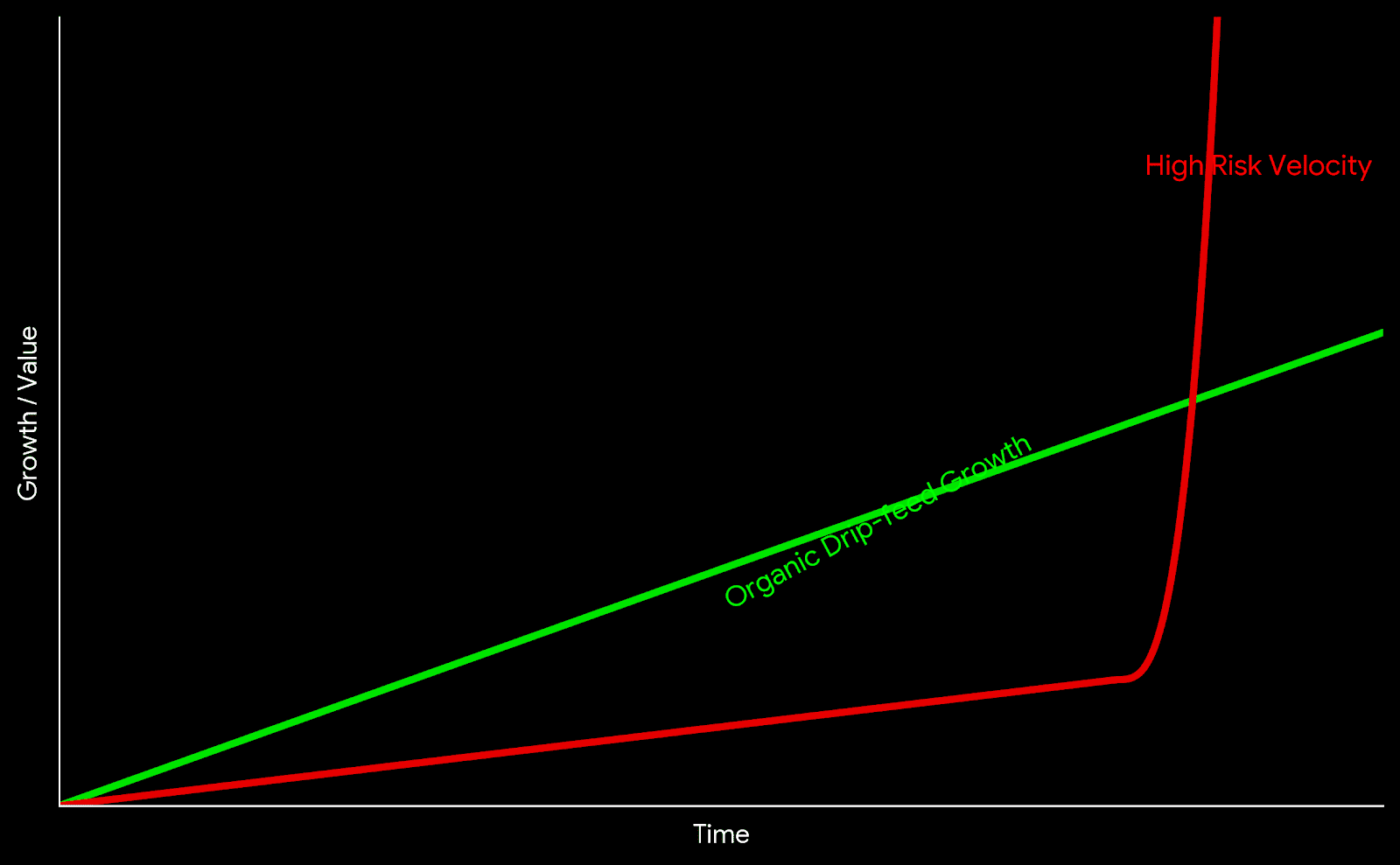
Chart comparing high risk velocity spikes versus organic drip-feed growth
Visualizing the difference between Velocity Spikes and Organic Growth patterns.

The "Warm-up" Protocol

For new accounts (under 3 months), professionals apply a progressive load scale:

  • Week 1: Organic posting, phone/email verification. Zero external services.
  • Week 2: Drip-feed at minimum speed (20-50 units/day).
  • Week 3: Increase limits to 100-200 units/day.
  • Month 2+: Transition to standard operational volumes.

The Sandbox Method (Testing)

Experienced resellers maintain "Sandbox" accounts—test profiles used to verify Service IDs before applying them to main projects. If a Sandbox account receives an Action Block or a Drop, the service is marked as risky and excluded from Tier-1 campaigns.

Safety Checklist

  • Service type verified as Real or HQ (Priority over Mixed/Bot).
  • Refill guarantee active (30/60/365 days).
  • Daily speed limits checked in description.
  • Test order completed on a Sandbox account.
  • Drip-feed configured (if available).
  • Account has organic activity (posts, stories) prior to start.

Conclusion

Safety in SMM automation is dynamic. Platforms like SmmPanelUS provide access to global infrastructure, but the user defines the application strategy. Choosing services with guarantees (Refill), using Drip-feed to manage velocity, and avoiding the cheapest market options ($0.01 per 1k) form the foundation for stable operations.

FAQ

Can an account get permanently banned for SMM services?

Yes, if violations are systematic and the account receives "Spam Reports" from real users. Isolated limit breaches usually result in temporary Action Blocks or follower removal (Drops).

What is Drip-feed and why use it?

Drip-feed is an automation feature that splits a single order into multiple smaller deliveries (e.g., 50 likes every 30 minutes). This creates a natural growth curve that is harder for algorithms to detect.

Why are expensive services considered safer?

Higher costs typically reflect the maintenance of high-quality account databases (with avatars, posts, history) and the use of residential 4G proxies, which bypass standard anti-spam filters.
SMM Panel: A Complete Guide to Architecture, Logic, and Operations

The digital marketing market often operates with abstract terms. What users colloquially call an "SMM Panel", engineers define as an API Request Routing Gateway.

For a student, a junior marketer, or a business owner, understanding this distinction is crucial. It separates those who blindly press buttons from those who understand the underlying mechanics of automation.

This guide analyzes the infrastructure: from the moment a request is created to its actual execution on the server layer.


1. What is an SMM Panel: Dual Definition

To truly understand the tool, we must separate the marketing interface from the technical reality.

The Surface Level (For the User)

An SMM Panel is a web-based marketplace where digital metrics (subscribers, views, interaction signals) are purchased in bulk. It functions like any e-commerce dashboard: you select a category, input a target link, and process a transaction.

The Core Level (For the Engineer)

Technically, an SMM Panel is a Control Plane connected via API (Application Programming Interface) to a network of execution servers. The panel does not "generate" the metrics itself. It acts as a dispatcher: it accepts your command, validates the budget, and routes the task to a server with available capacity.

In simple terms: Think of it as a logistics center. You submit a shipping order, and the system decides which truck (server) will transport your cargo (request) and which route it will take.


2. How It Works: Under the Hood

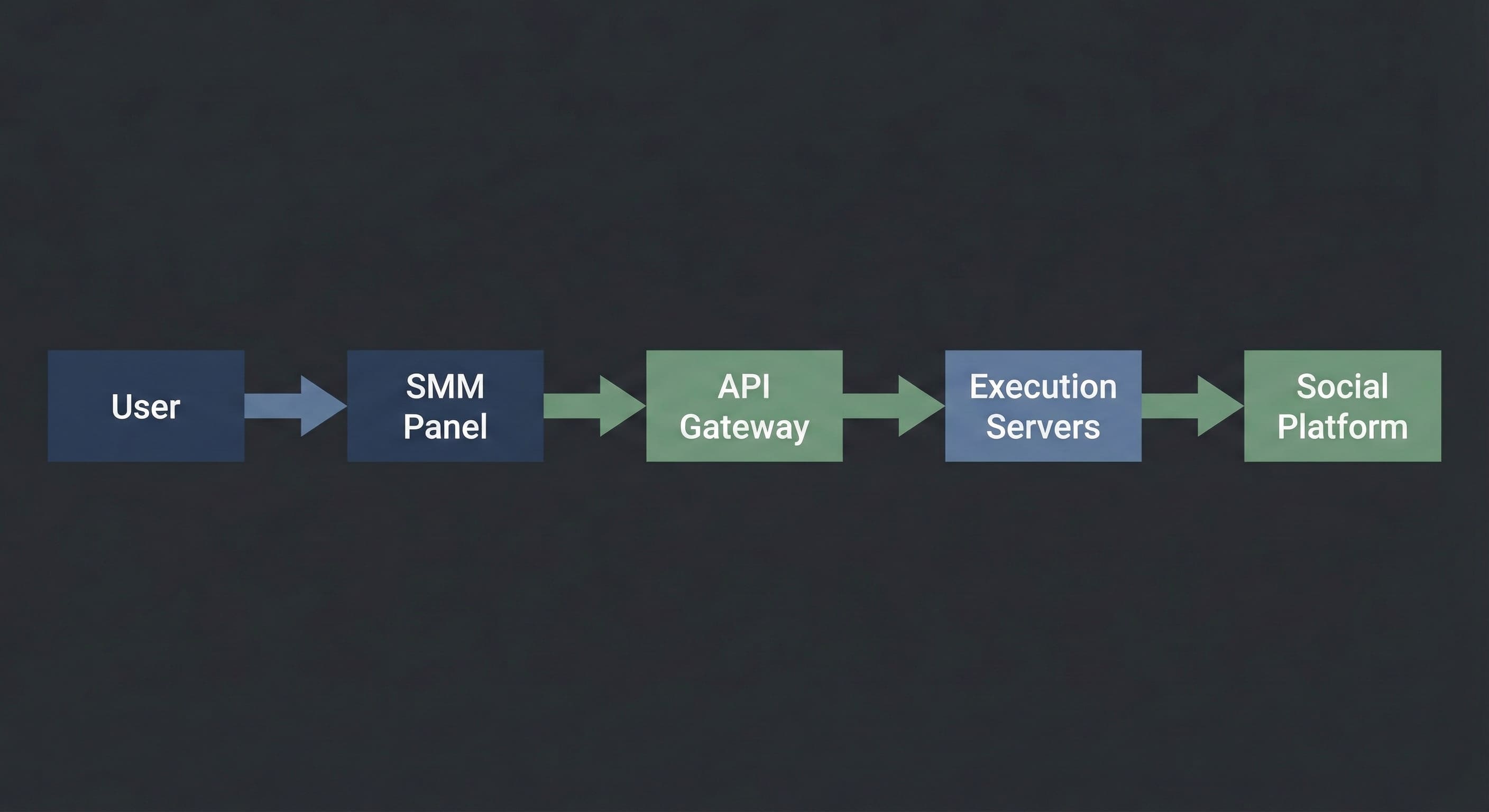
SMM Panel architecture diagram showing user requests routed through an API gateway to execution servers

The execution process is a linear data transmission chain. It remains consistent regardless of the specific interface you use.

[How it looks to you]:

  1. You select a service (e.g., "Telegram Views").

  2. You paste the link to the post.

  3. You specify the quantity (e.g., 1,000).

  4. You click "Submit".

[What happens inside the system]:

  1. Validation: The script checks if the link format is correct and if the user balance covers the transaction cost.

  2. Routing: Your order is assigned a unique ID and transmitted to the API Gateway.

  3. Queue: If the upstream server is available, processing begins immediately. If the server is under high load, the order enters a "Pending" state, waiting for a slot in the execution queue.

  4. Execution: The server initiates the interaction signals according to the script.

  5. Completion: The system receives a "Finished" signal and updates the status to "Completed".

Critical Note: This is not magic. It is a script. It executes exactly what you input. If you provide a broken link or a closed profile, the system may still attempt execution because it does not analyze context—it only processes code.


3. The Dictionary: Industry Terminology

To operate effectively, you must understand the technical vocabulary. Misunderstanding these parameters often leads to budget waste.

  • Start Time: The latency period before execution begins.

    • Instant: Processing starts within 0–5 minutes.

    • 1h / 12h: The task is scheduled for a later window.

  • Speed (Throughput): The maximum number of actions the system can deliver per 24 hours.

    • Example: "Speed 5k/day" means the system will throttle delivery to 5,000 units daily to stay within safety thresholds.

  • Drop Rate: The percentage of metrics that may be removed by the social platform’s cleanup algorithms over time.

  • Refill / Non-Drop: A guarantee feature where the system automatically re-queues lost metrics to restore the original count.

  • Drip-Feed: A scheduling logic that splits one large order into multiple smaller batches.

    • Example: Instead of 1,000 likes at once, you configure "100 likes every 60 minutes". This smoothes the traffic curve to mimic organic behavior.


4. Market Hierarchy: The Supply Chain

The SMM market is structured like a wholesale supply chain. Knowing your position helps you avoid overpaying.

  1. Providers (The Source): These entities own the physical hardware or the software logic that generates the signals. They operate via API only and rarely deal with retail customers.

  2. Resellers (The Panels): These are platforms connected to Providers. They build the user interface, handle customer support, and curate the service list.

    • Note: Approximately 90% of panels on the market are resellers. This is standard. A high-quality reseller adds value by filtering out unstable servers and providing a single access point to multiple sources.

  3. End Users (You): Agencies, freelancers, students, and businesses.


5. Why This Exists: Practical Use Cases

Beginners often mistake these tools for "vanity metrics." Professionals use them for specific infrastructure tasks.

A. Social Proof Engineering

User psychology is linear: people are more likely to follow a channel with 1,000 members than a channel with 5.

  • Goal: Establish a baseline visual authority to lower the barrier for organic subscriptions.

  • Tool: Initial population of counters (subscribers, views).

B. Reputation Management (ORM)

When a brand faces a targeted negative attack, positive or neutral signals can prevent reputational damage.

  • Goal: Balance visibility.

  • Tool: Routing positive signals to neutral comments to displace negativity from the top of the feed.

C. Hypothesis Testing (A/B Testing)

Media buyers often need to test ad creatives. To see if an ad performs, it sometimes needs "pre-heating."

  • Goal: Quickly validate if a creative can gain traction.

  • Tool: Automated interaction signals on ad posts.


6. Safety & Limits: How to Avoid Bans

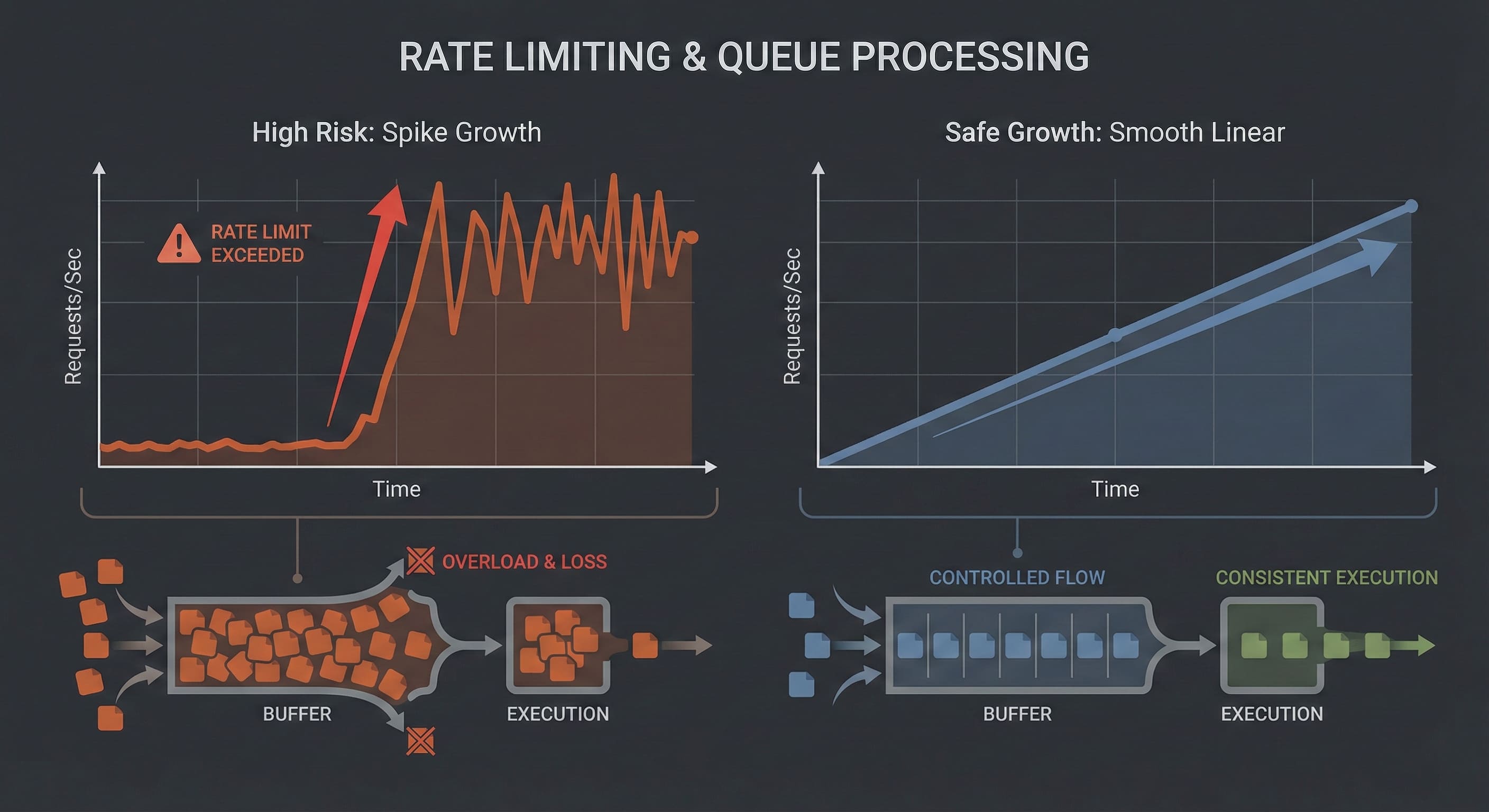
Visualization of rate limits and queue-based execution in an SMM Panel system

The biggest fear for new users is account suspension. It is important to understand: Platforms do not ban you for using a panel. They ban you for anomalous behavior.

Algorithms look for mathematical deviations, not the source of the traffic.

The Red Zone (Errors):

❌ Velocity Spikes: An account created yesterday suddenly gains 50,000 followers in one hour. This triggers automated flags. ❌ Empty Profiles: Traffic is directed to a profile with no avatar and no content. ❌ Metric Imbalance: A post has 10,000 likes but 0 views and 0 impressions. This is mathematically impossible in an organic environment.

The Green Zone (Best Practices):

✅ Smooth Curves: Use "Drip-Feed" or low-speed services. Growth should look linear, not vertical. ✅ Complexity: Mix different signal types. Likes should be 5–10% of Views. ✅ Gradual Scaling: Start small to test the platform’s reaction before scaling up.

The Golden Rule: Operations should remain within the plausible limits of human behavior. Slower is safer.


7. Troubleshooting: When Things Wait

Since this is technical infrastructure, latency and errors occur. This is operational reality.

  • Status "Pending" for a long time:

    • Cause: The server queue is full, or the upstream provider is undergoing maintenance.

    • Action: Wait. The system will either execute the order when capacity opens or cancel it and refund the balance.

  • Status "Partial":

    • Cause: The server delivered a portion of the request (e.g., 500 of 1,000) but could not complete the rest due to updated platform limits.

    • Action: You are charged only for the delivered amount. The remaining funds return to your balance. You can try a different server.

  • Status "Canceled":

    • Cause: Broken link, private profile, or geo-restrictions.

    • Action: Check your profile settings (it must be Public) and link format.


A Tool, Not Magic

An SMM Panel is a powerful automation utility. It removes manual labor, standardizes execution, and provides control over volume.

However, it has strict boundaries:

  1. It provides Infrastructure, not Marketing Strategy.

  2. It delivers Numbers, not Loyalty.

  3. It is an Assistant, not a replacement for high-quality content.

Treat the panel like an engineer: read the technical descriptions, respect the rate limits, and always test on small volumes before deploying large-scale campaigns.

Promotion of channels on messengers.

Channel promotion on messengers is not as difficult as it seems. Thanks to the convenient portal SmmPanelUS - a special website for providing SMM services. It's very convenient that you can quickly and effortlessly get free Telegram subscribers without any investments. Why is this possible? Here, new clients are motivated and welcomed with bonus credits for SMM promotion. How does the fast and free Telegram subscriber boost work? It's simple - using the bonuses from the social media promotion platform SmmPanelUS. The provider is known for its reliability and generosity towards its users. New clients receive a balance as an incentive to use for social media boosting. No expenses are required - simply place a test order to start the fast and free Telegram subscriber boost. All newcomers can get such a balance through a ticket or by requesting it on Telegram. It's easy, cost-free, and comfortable. Most importantly, it serves as proof of the effectiveness of the range of services offered by SMM panel SmmPanelUS. After achieving good results, you can confidently subscribe - SMM services are truly trustworthy.

Channel Promotion on Messengers

Discord Account Disabled: Reasons and Solutions

Planning to chat with friends, but instead of a warm welcome, Discord greets you with an account deactivation notification? Don't fret, let's sort it out. Contents: How to Tell If My Account is Disabled? Possible Reasons for Blocking What to Do? How to Tell If My Account is Disabled? Recognizing the deactivation of your account is simple: Discord will inform you with a red message upon login and send a ban notification to your email. Sometimes while using Discord, you may get logged out of your account, and re-entry becomes impossible. Possible Reasons for Blocking Like any service, Discord has its rules, and violating them can lead to account deactivation or deletion. When creating a new account on Discord, we agree not to: distribute unwanted content; engage in criminal activities; spam direct messages or customer support; abuse the reporting system; spread viruses; harass users; promote violence, cruelty, suicide, masochism; hack user accounts; violate copyright laws. Pay attention, even something as small as multiple incorrect password attempts can cause account deactivation. Read more about community guidelines on the Discord website. What to Do? If you haven't violated the community guidelines, then your account was likely disabled mistakenly. You can contact Discord support and appeal the deactivation: Go to the support page via the link to submit a request. In the dropdown menu, choose "Trust and Safety." Enter your email address. In the next dropdown menu, select "Appeals, Age Update, Other Questions." And finally, "Complaint about actions against my account or bot." Fill in the subject and description, then click "Submit." Done! The review process may take from 24 hours up to a week. Don't worry, Discord will definitely send you a response! If you did violate Discord's rules, the chances of account recovery are very slim. There's nothing sadder than lost channels, but instead of feeling down, it's easier to create a new account.

Discord Account Disabled: Reasons and Solutions

How to set up a translation bot in Discord?

Despite having a vast international audience, the popular communication service Discord does not have its own built-in translator. Fortunately, there is a special bot that supports over 100 different languages. Now, let's explain how to install and connect it to a Discord channel.

Contents:

  • How to Install Discord Translator Bot?
  • Discord Translator Alternatives

How to Install Discord Translator Bot?

It's straightforward, just follow the instructions:

  1. Go to the official translator website.
  2. Choose "Try for Free" and log in to your Discord account.
  3. Provide the bot access to the necessary account sections.
  4. The settings section will open. Choose the channel on the left panel to connect the bot.
  5. Make sure you can add the bot to the channel and click "Install Bot" (If you are the channel administrator, this step won't be an issue).
  6. Authorize the bot to create commands on the server and grant it necessary permissions.

Done! Now you can start translating. In the settings panel, you can choose the default channel language and configure automatic translation. The bot can also react to emoji flags: try selecting the Russian flag in reactions, and the bot will provide the necessary translation.

The translator bot does a great job with its task, though it claims it cannot bake a pie or tell bedtime stories. The only drawback is that the bot is only partially free. If you are not ready to pay $10 for the basic plan, there are alternatives.

Discord Translator Alternatives

In addition to the suggested translator bot, there are free alternatives. They may differ in functionality but are also worth considering. Which one to choose is up to you. Here is a list of the most popular ones:

  • Smoogle Translate - a free translator bot with very similar functionality: it offers automatic translation or using emoji flags.
  • Rita Bot - a 100% free translator bot created by the gaming community. You can enable automatic translation of all channel messages or use commands.

Typically, these bots use Google Translate technology for translation, so they are not much different in quality. They may have different features, so if one bot doesn't meet your requirements, you can try another. If you have any questions about how to install the translator in your Discord channel, feel free to write them in the comments, and we will try to help!


How to Set Up Discord Translator Bot

Are the servers accessible to all users?

What Servers Are Hosted? Are Servers Accessible to All Users?

Many people inquire about joining new and popular communities on the website. Typically, the provided URL is tracked, and a new identifier is assigned to the created channel. Avoiding duplicates and ensuring comfortable surfing is possible. So, familiarize yourself with the servers and learn how to connect to them.

What is that mysterious link and why is it needed? First and foremost, let's understand how the Discord link is used for server discovery. In reality, if you follow the provided address, it will immediately open the official Discord messenger website, but its domain will end with com. Why does this happen? Most likely, the main address is specifically used for channels, hence the format.

The Most Popular Servers Here

It's known that in Discord (https://discord.gg/), several commands have been created, making it almost impossible to list them all. Therefore, we decided to highlight the main channels that are the most popular. You can find them in list format with the following descriptions:

  • /passiflower - a Russian group consisting of Among Us game fans. It has around 80,000 participants, and their number is constantly growing. You can form a team and find friends for communication and entertainment.
  • /animeru - a team of anime enthusiasts. There are already 140,000 users, and everyone can participate. Most importantly, all communication takes place exclusively in Russian.
  • /fdQk6D7SXX - a server for voice communication and games. According to its creators, more than 300 people can be in the voice chat simultaneously.
  • /G3eNESt - a dedicated server for the popular game Roblox. It has approximately 73,000 members, and interestingly, it is led by the famous blogger Zhenyasha.
  • /9sjzmvy - the page of a medium-sized school in Tambov.
  • /genshimpact - Genshin Impact - the largest Russian-speaking server that unites a large number of gamers. If you join this community, you'll quickly find like-minded individuals and acquaintances.

Be Attentive!

If you want to download the Discord program on your computer, simply visit the official website - and guess what? On the opened page, click the phrase "Download" and install the program.

So, we have looked at the most popular Discord servers. After this, any value may be displayed, whether it's pzfbtvm, grsvcg2, or even gdsgwrr. This combination represents a unique identifier assigned to each channel. For additional information, you can use the official messenger website. Have other questions about the topic of the article? Feel free to ask them in the comments!


Are Servers Accessible to All Users?

All About Discord API: What It Is and How to Install

Bots and applications are the lifeblood of the Discord developer community. They come in all shapes and sizes, from small hobby projects for personal servers with friends to massive projects living on hundreds of thousands of servers. Creating your own project doesn't require full expertise in app development. There are plenty of ready-to-use tools that can assist you in development. Discord offers developers an open API for bots. Let's take a closer look at what Discord API is.

Contents:

  • What is Discord API and where to find it?
  • How to connect Discord API?
  • How to add Discord authorization to your website?

What is Discord API and where to find it?

Discord API is a part of the Discord server that receives requests and sends responses. It contains all the functions of the application, allowing you to add Discord authorization to your website or connect an assistant bot to your server. For detailed information about Discord API, you can refer to the Discord Developer Portal. The only downside is that all documentation and instructions are in English. To use Discord API for bot development, you need to obtain a token consisting of letters and numbers. The token acts as a "key" to control the bot, sending API requests and receiving responses. Now, let's find out how to get it.

How to connect Discord API?

Generating a token is quite simple, follow the step-by-step instructions:

  1. Go to the Discord Developer Portal page and sign in to your account.
  2. Select the "Applications" section and click "New Application".
  3. Choose a name for your bot. As an example, we named the bot "New Discord Bot".
  4. In the left panel of the developer portal, select the "Bot" tab with a puzzle piece icon.
  5. In the opened section, click "Add Bot". A confirmation window will appear, click "Yes, do it!".
  6. A green rectangle with the text "A wild bot has appeared!" will indicate that you've done everything correctly. The token will appear on the page, you can view it by clicking "Click to Reveal Token", and copy it by clicking "Copy". The token is ready, and you have successfully connected the bot to Discord API. Now, you can proceed with bot development by searching for "create discord bot tutorial" to find numerous guides, mainly in English.

How to add Discord authorization to your website?

Developers on Russian and foreign forums often inquire about this. There are also many tools created to simplify the task. In the left panel of the developer portal, select the "OAuth2" tab. For more information on Discord authorization in your application, read the following links:

  • Python example on GitHub: https://github.com/discord/discord-oauth2-example
  • Discord JavaScript example: https://github.com/discord/discord-oauth2-example

We have thoroughly covered Discord API and how to connect it. We hope that our article will help you in bot or application development. If you have any questions about the Discord API topic, feel free to write in the comments!

https://storage.perfectcdn.com/3cu3s8/i1h8ec373m4eo6ky.png

App Store Charging Feature

App Store Charging Feature: Charge Your Device from Other Devices

The App Store charging feature allows you to charge your device from other devices using the lîn app. It is designed for transferring multimedia files to Android smartphones and operates through Bluetooth. We will guide you on how to set up and use this technology.

Firstly, you need to enable Bluetooth and remote control on your smartphone. To do this, swipe down from the top of the screen and touch the number of items in the appeared list. This option should be activated. Then, open settings and scroll down to Google. Go to "Data and Data Sharing" - "Nearby Share." Then, slide the toggle to the active position to enable this feature.

So, whether you're talking about friends, schemes, photos, or links, you can use it freely. You will receive notifications and alerts. Press the "Done" button.


App Store Charging Feature

Android Nearby Share: How Data Sharing Feature Works

Android Nearby Share: how data sharing works Android Nearby Share allows you to share information from one cell phone to another. It is provided for a communication channel from Android to Android and operates via Bluetooth. Let's discuss briefly about such control with the help of this innovation. How to turn on Nearby Share Android Nearby Share is similar to AirDrop, operating exclusively over Bluetooth, not Wi-Fi. Usually it is activated by various actions. All you need is a phone running Android 6 or higher and the appropriate options. First, turn on Bluetooth and the geometric position on the device. Next, swipe down from the top of the screen, where some icons are displayed in the displayed item that turn on. Then go to the options and go to Google, located at the bottom. Go to the block "Devices and data exchange" - "Exchange with the environment". Then move the slider to the intensive state for successful activation. How to share information with other users When sending data to your friends, for example, photos, links and others, you will need the "Sharing with the environment" option. Remember that the second user is always in your vicinity, since all data is sent via Bluetooth. Open a file to send, for example, a picture in your own gallery. Click the Share button at the bottom of the screen. There will be different exchanges. Click on the gray button: "Exchange with the environment." Then you need 2 cell phones for short distance with each other. In the "Search for nearby devices" block, select the phone of the second person in order to exchange information. The user of the second gadget confirms his request and receives the file, and the possibility that your information is for third parties will be eliminated. When the message "Submitted" appears, your file will be sent. Finally, click "Done" and return to the main menu.

Android Nearby Share: how the sharing feature works

How to Restart Any iPhone Model

Users often joke that to solve almost any phone problem, all you need to do is turn it off and turn it back on again. Indeed, a reboot can often help if your iPhone is behaving strangely. It's quite simple to do, but different iPhone models reboot in different ways. In this article, we will look at how to turn off and reboot iPhones of models 7, 8, X, 11, and 12. Turning off iPhone 7 Turning off an iPhone 7 and all its predecessors is quite simple. Just follow these steps: Press and hold the power button on the right side of the phone (or the top in earlier versions) for a few seconds. Then, hold and swipe the appeared "power off" button on the screen to turn it off. The smartphone's screen will go blank and stop responding to touch. This method is very convenient, and all your open apps and tabs will be saved. In case the screen doesn't respond to swiping, you will have to perform a forced reboot. Your data will be saved, but closed apps will need to be reopened. How to perform a hard reboot: for models older than iPhone 7, press and hold the lock button and the "Home" button simultaneously. For iPhone 7, press and hold the volume down button on the left panel and the lock button simultaneously. Hold the buttons for about 5-7 seconds, and the iPhone will turn off. Turning off iPhone 8 The eighth model in the iPhone lineup was known to cause issues and often required reboots. The shortcomings have been fixed, but it's still useful to know how to restart an iPhone 8 in emergency cases. You can do it by holding down the power button or using one of the following methods: In the "Settings" section, find "Turn Off" at the bottom, tap, and swipe the slider. This method will save you if the lock button is not working. Hard reboot: press the volume up button and release, then press the volume down button, and finally, hold down the lock button. Release the button as soon as the Apple logo appears. This method is suitable if your screen doesn't respond to touch. Turning off iPhone 10, 11, 12, 13 Modern iPhone models are quite different from their predecessors, and turning off the smartphone in the usual way won't work. There are two ways to turn off an iPhone X and newer models: Through the "Settings" section, similar to iPhone 8. In the "General" settings, select "Turn Off" and swipe the slider. Using the Emergency Call feature, hold the lock button and one of the volume buttons until the sliders appear. How to turn off iPhone without buttons This method works on all models from iPhone 5S and older. When the buttons on the smartphone are not working, it can be quite uncomfortable to use. This problem can be solved using the Accessibility feature. To enable this function, follow these steps: Find "Accessibility" in the settings. Open the "Touch" or "Assistive Touch" section. Slide the toggle to the right to enable the function. A small button will appear on the screen. Double-tap the button and choose "Device" -> "More" -> "Restart" in the menu. Wait for the device to turn off. How to turn off iPhone without a touch screen Modern iPhone models have few physical buttons, and turning off the smartphone can be challenging if the screen is broken and not responding to touch. Here are some methods to try: If the touch screen is partially responsive, try holding down the lock button and one of the volume buttons, then swipe your finger above or below the text in another part of the screen. If the screen is entirely broken, try a blind shutdown by swiping your finger along the bottom part of the screen. If these methods don't work, you can wait until the battery drains and then plug the iPhone back into a power source to reboot it. However, if your smartphone has broken buttons or a screen, you will eventually need to visit a service center.

How to Restart Any iPhone Model

关于 SmmPanelUS 博客

这里写什么,不写什么

博客放的是运营 SmmPanelUS 平台的人留下的工作笔记:目录按什么标准归类,一笔订单从创建到 Completed 状态要经过哪些环节,Partial 出现的那一天它究竟意味着什么,余额由哪两部分组成,以及怎样把 API 接到您自己运行的前端上。写法偏操作:哪个字段写在哪里、该先看什么、哪一步做错会让整笔订单白跑。也会写一些读法,比如同一个指标下两个工具该怎么挑,备注那一栏写了什么就得照着做。每篇尽量只讲一件事。

文章都是事情做完之后才写的,不是先公布、再回头去对齐。所以这里讲流程的文字比讲公告的多;写进去的数字一旦变了,文章也跟着改,而不是只换一个日期重新发一遍。短文居多,只有确实需要一条公式或者一小段代码的时候才写长。本页上方的搜索框按标题筛选,排序可以切到按拼音。API 页面给的是字段,博客给的是判断。

这里没有的东西同样重要。我们不预测某个网络以后会怎样对待一个账户,不和别的平台做对比,不写客户名字,也不提前给您一个数字。没有评价,也没有案例,这两样在这一行里太容易编出来。SmmPanelUS 从 2021 年起公开运营,博客守的是和目录一样的线:一个工具靠它做什么、要求什么来说明,别的不加。一篇文章讲不清的事,宁可留着不写,也不用形容词去补。写不准的事,等弄准了再写。

写给谁看

读者大致是三类。第一类自己管账户,宁愿把一笔订单下对,也不愿凭感觉下三笔;这类读者最常用到的是工具页上写要求的那一行,问得最多的也是开始时间和要求这两栏怎么对上。第二类是需要在一个季度里把活动水平保持平稳、并且要提前算清支出的商家,他们关心的是节奏和单价,不是一次性的量,所以更在意同一个指标下不同工具的价格差。下单量也写在同一屏上,不必先充值才看得到。

第三类是在 API 之上搭自己那一层的代理商、经销商和开发者。他们看重的不是句子,而是结构:在把客户放到后面之前,机制必须有文字可查⁠——返回值是什么含义、哪些字段可以信、什么情况下要停下来人工确认。重试的节奏、同一条链接上多笔订单叠在一起该怎么分开看,也都写过,不是这里才第一次提。所以讲子账户结构和 API 密钥的文章在这里是基础话题,不是进阶话题。

注册需满 18 岁,博客也不按入门读物的口气写。代理商和经销商无需事先通知即可持有最多 10 个账户。在这个范围内账户怎么分更好管、哪些订单适合分开记账、子账户之间的密钥该不该共用,都是博客会写的内容。做这类安排之前,先把一笔订单在单个账户里走通,比先搭结构省事,错的地方也更容易找。

文章默认您知道的词

目录由工具组成。一个工具就是一个可以下单的条目,它带着自己的指标、面向的网络、地区、速度,以及附在上面的条件;条件这一块通常包含要求、备注和能不能补充这几类信息。SmmPanelUS 是平台,平台里的条目叫工具。这个区分一松,后面所有术语都会跟着模糊,所以博客里从不换着说。读一个工具,先看指标和网络对不对,再看地区和速度能不能接受。

订单针对一个工具创建,用的是那一刻目录上显示的价格,这个价格就是价格。目录之后再怎么动,都不会追到一笔已经在跑的订单上。金额全部以 USD 计,按每 1000 计价,起步价很低:1000 粉丝 $0.01 起,1000 点赞 $0.002,1000 播放 $0.0003,1000 评论 $0.004,1000 流量 $0.01。同一个指标下会有若干个工具,价格不同,开始时间和条件也不同,选哪一个是要读过才知道的。换一个工具重下一笔,和改一笔正在跑的订单,是两件不同的事。

余额是一个数字,背后却有两部分。Deposited Funds 是您自己充进来的真实款项;Promotional Credit 属于促销性质,没有货币价值。所以看余额这个数之前,先看清它由哪两部分凑成。凡是涉及补充(refill)、申诉和提现的文章,都会说清指的是哪一部分,因为结果正是由这个区分决定的。把两者混在一起算,是新用户最容易出的一类误会。

您可以自己核对的部分

博客讲的内容,大部分在您做任何决定之前就看得到。每个工具的开始时间、速度和条件都写在价格旁边,不在页面底部,也不在下单之后。开始时间说的是从创建到开动的那一段,速度说的是开动之后每天走多少,这两个值要分开看。条件那一栏写的是下单前就要满足的事,不是下单之后才生效的说明。价格旁边这几栏是下单页上信息密度最高的地方,值得多花半分钟。

订单显示 Completed 或 Partial 之后,有 3 天时间提出申诉;这 3 天从状态变成 Completed 或 Partial 的那一刻起算,不是从下单那天起算。Partial 中没有交付的那一部分会退回余额。提现手续费不超过 10%。账户连续 12 个月没有动作会被冻结,而不是被悄悄清空。这些数字不是博客为了讲解编出来的,而是订单页和账户页上本来就显示的值。这些值变动的时候,博客里对应的那篇也跟着改。

隐私这一块也一样:不接第三方分析,不放广告追踪代码,不保存卡片信息,密码不做找回、只做重置。这几条在浏览器里就能自己验,不必相信任何一段文案;开发者还可以直接看页面请求里有没有外部域名。以上内容具有约束力的版本是 我们的规则。博客负责解释,规则负责决定;两边读出来不一样的时候,以规则为准,不以页面上的说法为准。

出问题的时候

订单会卡住,Partial 会少到货,链接可能是私密的,工作根本起不来。博客把这些当成日常工作的一部分来写,并给出顺序:先读订单状态,再核对一遍工具的要求,然后在账户里开工单。顺序反了最费时间⁠——先问人、再回头看页面,往往要多等一个来回。开工单的时候把订单号、链接和您看到的现象一起写上,能省掉第一轮问答。订单卡住时,链接的可见性是最先该查的一项,不是工具本身。

在账户里开的工单最快,因为它带着订单一起到,核对时少一个来回。客服在 10:00–23:00 SGT 读工单;这个时间之外发出的工单不会丢,会在下一个工作时段按顺序处理。法务、滥用举报、账务、安全和隐私各有单独的邮箱地址,放在 mail.smmpanelus.com 上,而一般的订单问题走工单仍然最快。

这一节里有一行比其他内容都重要:只在 smmpanelus.com 上登录。SmmPanelUS 不会先给您发消息,索要密码、验证码或付款。这样做的人不是我们。博客每当话题靠近这里,都会把这句话再写一遍,不管读起来多重复⁠——这一条重复一百次也不算多。

创建账户后可查看目录

登录后即可打开目录,价格以 USD 计。注册面向 18 岁及以上用户。

账户安全 只在 smmpanelus.com 上登录。SmmPanelUS 不会主动联系您索要密码、验证码或付款。支持通过工单进行,时间为 10:00–23:00 SGT。 我们的条款.

登录后查看目录
凭账户访问
创建账户